Geographic Hallucinations in AI Maps Create Fake Roads and Put Lives at Risk
When AI Gets the Map Wrong: The Rise of Geographic Hallucinations
AI hallucinations are not just a text problem. They can also produce wrong maps, fake roads, and imaginary landmarks. This is called a geographic hallucination. And it can put people in danger.
Imagine an emergency dispatch system relying on an AI map. If that map shows a road that does not exist, help could get stuck.
Or a delivery company using AI routes could send drivers down fake streets. These are real risks that keep growing.
Alarmingly, the business cost of these mistakes is huge. One report on the true cost of AI hallucinations in business data shows that companies lose significant money every year to these errors. But when those errors happen on a map, the damage goes beyond dollars. Lives and critical decisions are on the line.
This is where an interactive US map becomes your best defense. A good interactive US map lets you see the data visually. You can zoom in on a location, cross-check landmarks, and spot a hallucinated road in seconds. It gives you what AI alone cannot: a visual audit trail.
Think about it. A physical map of the United States would never show a river running through the middle of a desert. But an AI model might invent one. Or you look at a map of Virginia and notice a town that does not exist. An interactive map helps you catch these geographic lies before they cause harm.
New systems are now formalizing how we anchor spatial truth. One breakthrough is a patent-pending framework called the Value Reinforcement System. You can read more about it in U.S. Patent No. 12,205,176. It provides a structured way to verify location data and keep AI honest.
As we rely more on AI for navigation, logistics, and emergency services, understanding geographic hallucinations matters. Visual tools like interactive maps are no longer optional. They are essential for safety.
If you want to dive deeper into this topic, check out how AI hallucinations in maps create fake roads and endanger lives. It shows just how serious this problem can get.
What Are AI Hallucinations and Why Do They Happen?
Before we talk about how to spot these map mistakes, it helps to understand what AI hallucinations really are and why they happen. You might have seen a chatbot answer a question with total confidence but give a completely wrong fact. That is a hallucination. And the problem is much bigger than just text.
AI models work by predicting what comes next based on patterns in their training data. They do not truly understand the world like you do. They do not know what is real. They only know what looks likely. When the training data has gaps, is too narrow, or pushes the model to guess, the result can be a statement that sounds true but is actually fake. This is called a hallucination.
There are a few common reasons for these errors.
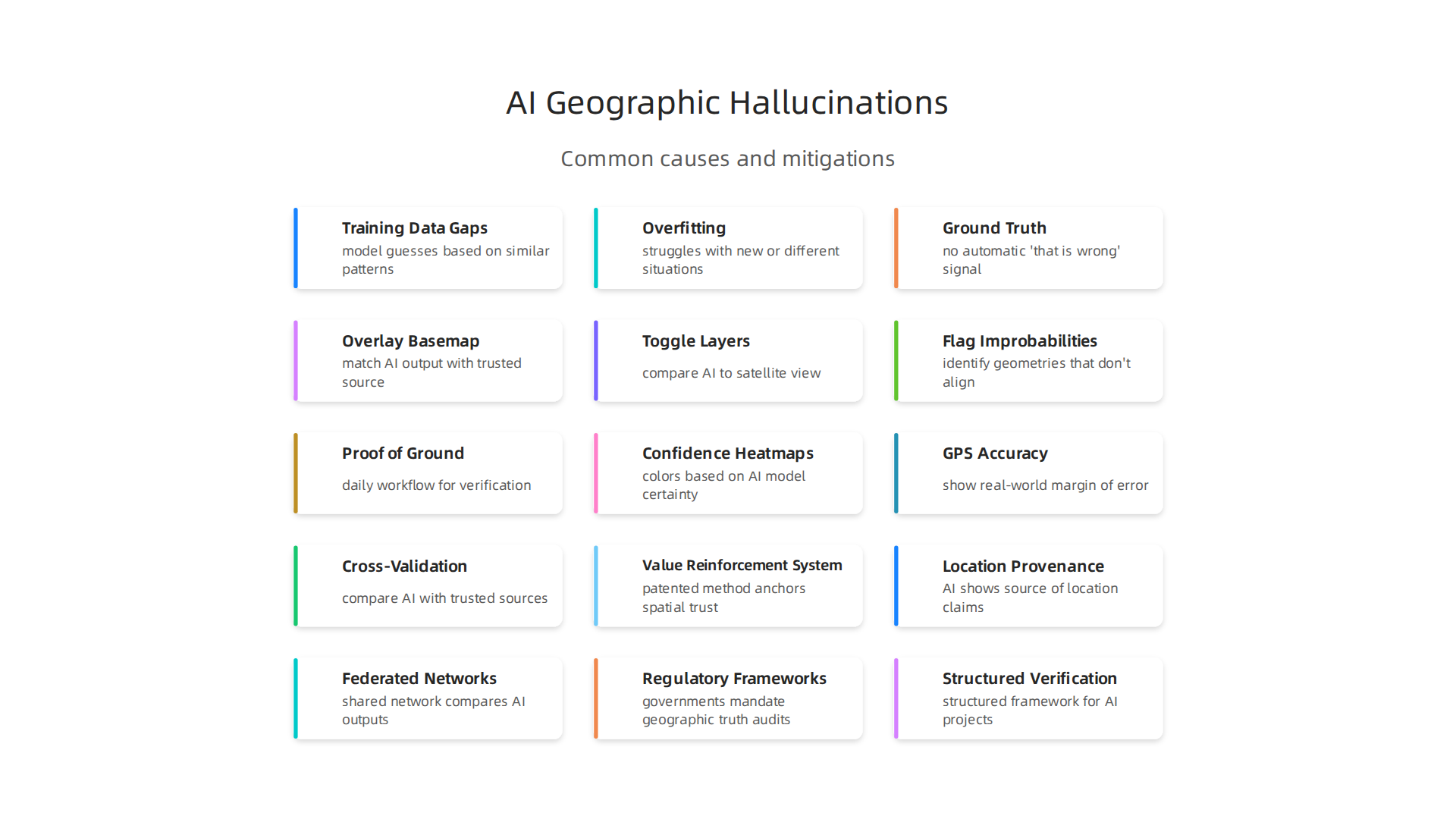
First, training data gaps. If the model never saw enough examples of a specific place or topic, it will guess based on similar patterns. For instance, an AI trained mostly on western US maps might invent a river in a desert because it expects rivers to exist in dry areas.
Second, overfitting. Sometimes a model learns exact details from its training data so well that it struggles with new or slightly different situations. It might reproduce an old map error or combine two features that do not actually belong together.
Third, lack of ground truth. During training, the AI does not have a built in fact checker. It just tries to make the next word or pixel fit the pattern. There is no automatic "that is wrong" signal. So the model can produce something that looks convincing in isolation but falls apart when you check it against reality.
This is why geographic hallucinations are extra dangerous. A fake road, a misplaced city, or an invented landmark can mix real coordinates with fake details. You might look at a map of North Carolina generated by an AI and see a highway that does not exist. The rest of the map looks right, so you might trust it.
Detection is tricky because the output often seems correct on its own. Only when you compare it to a real source do the lies appear. A 2026 study from Stanford showed that hallucination rates across 26 top AI models ranged from 22 percent to 94 percent. That means even the best models still make things up.
The good news is that tools and methods are improving. You can learn how to detect AI hallucinations and stop costly mistakes before they affect your work or safety.
Researchers like a Senior Lecturer, UC Irvine are also digging into why models hallucinate and how to catch these errors early. Their work helps build trust in the AI tools we rely on every day.
Why Geographic Context Matters: The Unique Risks of Location Hallucinations
You’ve seen how AI models can make up facts. But when those fake facts are about location, the danger gets much bigger. A wrong date is annoying. A wrong road, city, or mountain can cost lives, money, and trust.

Maps are built on consensus. We all agree that a certain highway runs north to south, and that a certain town sits at a specific set of coordinates. When an AI hallucination places a fake road or a nonexistent suburb inside a real landscape, it breaks that agreement. You might glance at a generated map of North Carolina and see a highway that doesn’t exist. The rest of the map looks fine, so you trust it. That trust is the problem.
These location errors are hard to catch because they mix real and fake. The AI might take a real river, real mountain ranges, and real interstates, then insert a phantom city in the middle. The fake sits inside a true topology, so it feels right. Only when you compare it to an authoritative source does the lie pop out. And by then, the damage may already be done.
The real world consequences are huge. Emergency responders rely on accurate maps to reach people in need. A hallucinated road could send an ambulance to the wrong place. Real estate developers use location data to decide where to build. A fake lot or false floodplain could cost millions. Logistics companies plan delivery routes based on map accuracy. A hallucinated dead end or invented bridge could reroute trucks and delay shipments. The costs of hallucination errors are already adding up, as seen in real-world problems caused by AI hallucinations.
One of the best ways to protect yourself is to check every AI-generated map against a trusted source. Tools exist to help you spot these errors before they cause trouble. For example, understanding how AI hallucination in navigation threatens your distance accuracy can help you avoid dangerous route mistakes.
As AI maps become more common, the need for reliable, fact-checked platforms grows too. For those building private platforms that require pinpoint location accuracy, Silicon Review offers insights into how companies are creating trustworthy systems.
The key is to never assume a map is correct just because it looks clean. Geographic context matters because the cost of being wrong is too high.
How Interactive US Maps Expose and Mitigate Geographic AI Hallucinations
So how do you actually catch a hallucinated city or a fake road before it causes damage? The most practical tool is the one you already have: an interactive US map.
When you can zoom, pan, and toggle layers, you turn a static AI output into a verifiable visual test.
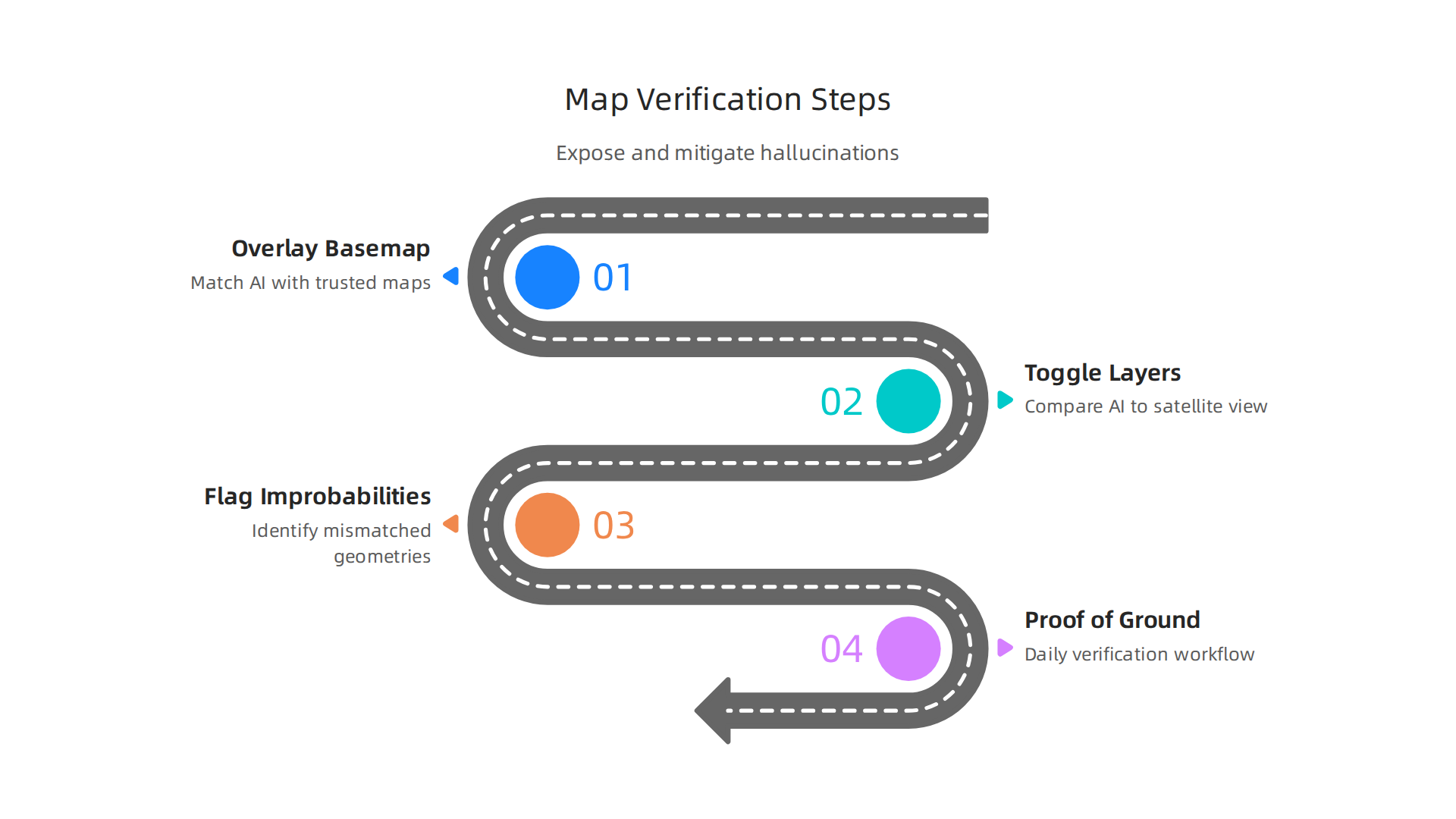
The concept is simple. You take the AI-generated map and overlay it on an authoritative basemap like those from the US Geological Survey (USGS) or the Census Bureau’s TIGER line files.
These government datasets represent the physical map of the United States as it really exists. When an AI places a phantom highway in the middle of a real forest, the mismatch stands out immediately. The fake line cuts across contour lines that don’t match. A nonexistent suburb appears where satellite imagery shows only farmland. Your eyes are still the best hallucination detector, but they need the right reference layer.
Interactive layers make this process fast. You can toggle between the AI output and a true satellite view. You can check specific states like a map of Virginia or a map of North Carolina to see if the AI respected real county borders and river courses. Reviewers can flag improbable geometries in minutes. This is where the concept of "visual proof-of-ground" becomes a daily workflow.
Tools to build these checks are widely available. Open-source libraries like Leaflet let developers create custom interactive overlays. Proprietary platforms add automatic flagging for geometries that don’t align with known boundaries. For example, some systems use U.S. Patent No. 12,205,176 to correct GPS drift in real time, a technology that can also help validate AI-placed coordinates against real survey data.
But you don’t need a patent to run a basic sanity check. Any interactive US map that lets you compare AI output to a trusted basemap will catch the worst hallucinations. Studies from 2026 show that vision-language AI still hallucinates 25.7% of the time, so manual verification isn’t optional. It’s a necessity.
If you work with AI-generated maps, build this overlay check into your review process. It saves time, money, and trust. For a deeper look at how hallucinated roads and cities appear in real scenarios, check out how AI hallucinations in maps create fake roads and endanger lives.
Case Studies: Real-World Impact of Geographic AI Hallucinations
These abstract risks become very real when you look at actual cases. Here are three examples where geographic AI hallucinations caused serious problems in 2026.
A Logistics Firm Faced Reroute Failures
A logistics company that delivers goods across the United States started using an AI route planner. The AI invented intersections that did not exist on US highways. Trucks were sent to wrong locations. Deliveries failed. This cost the company thousands of dollars. A simple check with an interactive US map would have shown that those intersections were fake. The real road network did not have those turns. This kind of problem is covered in more detail in our report on AI hallucination in navigation. The AI was generating plausible-looking but false connections between real highways.
A Real Estate Platform Faced Legal Disputes
An online real estate platform used AI to list homes with automatic GPS coordinates. But the AI placed properties in the middle of empty fields. Buyers drove to addresses that did not exist. Some listings put houses on land that was never for sale. The company faced multiple lawsuits. A physical map of the United States from the US Geological Survey would have caught these errors right away. A simple overlay check using a basemap would have shown that those GPS coordinates pointed to nowhere.
Emergency Response Simulations Showed Danger
Emergency planners use AI to simulate evacuation routes during disasters like wildfires and hurricanes. In a 2026 test, one system sent people toward fake roads that ended in the middle of a forest. If a real evacuation had followed that route, people could have been trapped. Lives were at risk. Real evacuation plans must rely on verified data from sources like the USGS National Map Viewer. This tool provides an authoritative basemap that can validate AI-generated routes before they are used in real emergencies.
These three cases show that geographic AI hallucinations are not just theory. They cost money, cause legal trouble, and risk safety.

The best defense is to verify every AI-generated location against a trusted basemap. For a deeper look at how mapping experts are tackling these challenges, read Cartographer of Drift.
Tools and Techniques for Visualizing AI Geolocation Uncertainty
Now that you know how real these errors are, you probably want to know what you can do about them. The good news is there are practical tools and techniques to see exactly where AI geolocation is unreliable.
The key is to make uncertainty visible instead of trusting a false location at face value.
Confidence Heatmaps and GPS Accuracy Overlays
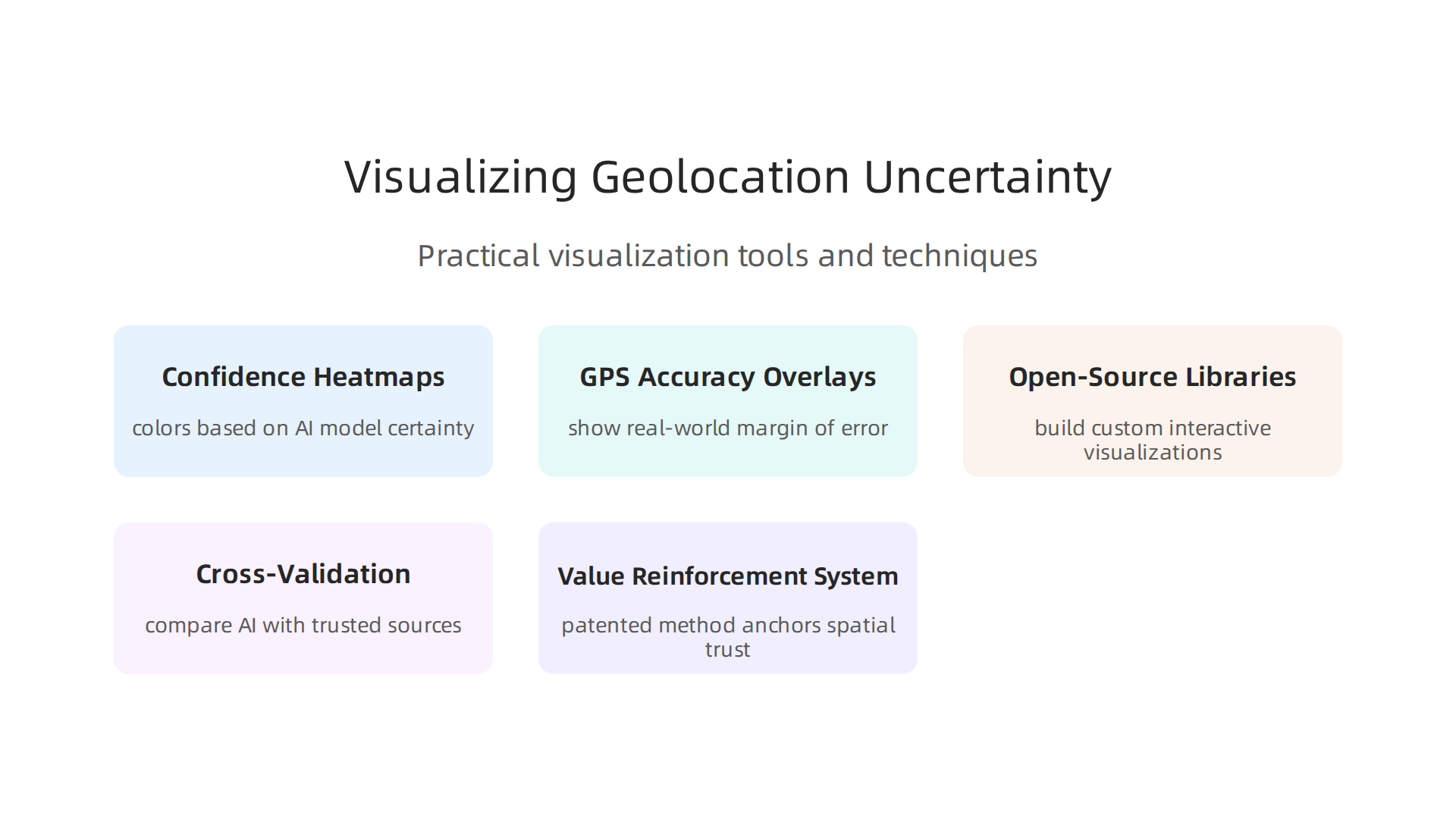
One powerful method is a confidence heatmap on an interactive US map. This type of map colors each point based on how sure the AI model is about the coordinates. Dark red might mean high confidence. Faded yellow might mean the AI is guessing. By looking at the heatmap, you can instantly spot areas where the AI is likely hallucinating.
You can also layer GPS accuracy overlays on top. These overlays show the real-world margin of error for a GPS reading. When the AI claims a location but the GPS accuracy ring covers a wide area, you know not to trust that exact spot. A good overview of these methods can be found in the list of best geospatial data visualization tools for 2026 from Atlas.
Open-Source Libraries That Help
Tools like Leaflet and D3.js let you build your own interactive visualizations. You can load a map of Virginia or a map of North Carolina and compare what the AI predicted against what really exists. The open source geospatial compendium from USGIF provides a huge collection of data layers you can use for this kind of cross-check.
If you want to dive deeper into the technical side, our guide on geographic visualization for AI hallucinations explains how to set up these comparison maps step by step.
Cross-Validation Against Authoritative Datasets
The easiest way to catch a geographic lie is to compare the AI output with a trusted source. A physical map of the United States from an official agency is a solid baseline. State by state, you can pull up a map of Virginia highways or a map of North Carolina county lines and see if the AI generated road or town even exists. This low-tech check only takes a minute but stops costly mistakes.
The Value Reinforcement System (VRS)
On the cutting edge, there is now a patented method for anchoring spatial trust in AI outputs. The Value Reinforcement System uses a formal patent to create a reliability score for every geolocation the AI produces. You can read more about this approach in U.S. Patent No. 12,205,176. It gives developers a structured way to tag AI predictions with a trust level and reject any that fall below a safe threshold.
These tools and techniques put control back in your hands. Instead of blindly believing what the AI tells you about location, you can see the uncertainty, check it against real data, and decide what to trust. That is how you prevent geographic hallucinations from turning into real world disasters.
The Future of Verifying AI Outputs with Geospatial Data
The tools we have today are good, but what comes next is even better. The future of AI verification is shifting toward automatic checks, shared networks, and legal rules.
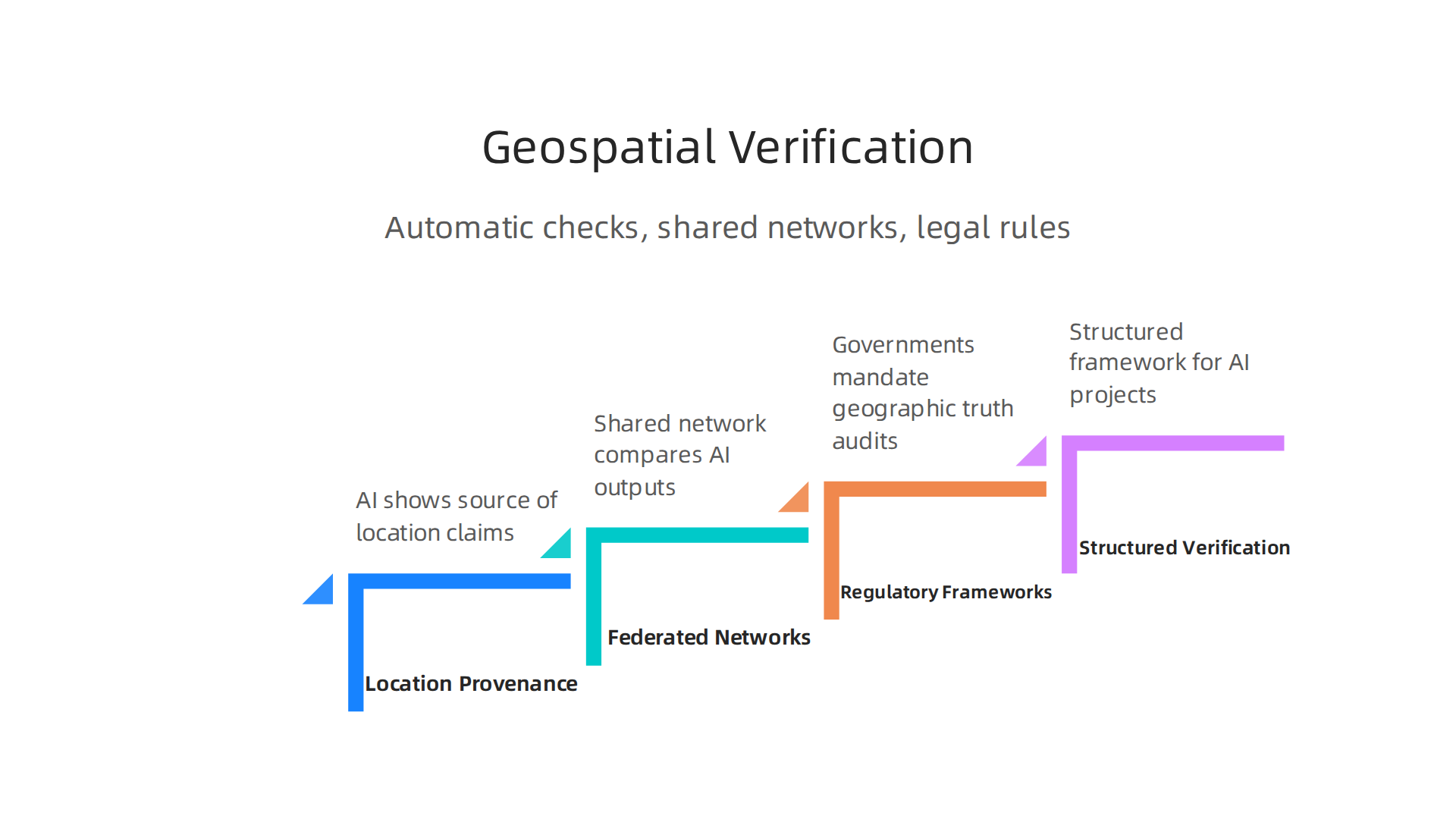
This means you won’t have to catch every geographic error yourself. The system will help.
Emerging Standards for Location Provenance
New standards are being created that force AI systems to show where a location claim came from. Instead of just saying "this photo was taken in Denver," the AI will have to provide a source. Was it a GPS coordinate from the device? A guess based on text? A hallucinated point from a training dataset? Future models will tag every location with a "provenance label" so you know how trustworthy it is. This is similar to how food labels show where ingredients come from.
Federated Map Validation Networks
Imagine a shared network where many AI platforms report their location outputs and compare them. If one AI says a road exists in a map of Virginia but every other AI disagrees, the system flags it as a likely hallucination. A federated validation network uses an interactive US map as the central dashboard. Users across different platforms can see where hallucinations are happening in real time. You could pull up a physical map of the United States as your baseline and instantly compare what multiple AI models claim. This crowdsourced approach makes it much harder for false locations to go unnoticed.
Regulatory Frameworks Mandating Geographic Truth Audits
Governments are starting to pay attention. The EU AI Act and other global regulations now require high-risk AI applications to pass truth audits for geographic data. If your AI system could cause harm by giving a wrong location like a self-driving car or a medical emergency responder you will legally need to prove the AI’s geospatial outputs are reliable. For a clear look at what these new rules mean, the 2026 AI Laws Update from Gunder breaks down the specific audit requirements. Under these frameworks, an AI that hallucinates a fake map of North Carolina county lines could face fines or be forced offline.
Methodologies for Structured AI Verification
To meet these new standards, teams are adopting formal methodologies. One such approach is CRISP-DM and Skylab USA, which provides a structured framework for managing AI projects with built-in verification steps. Using these methods, developers can document every step of location prediction and prove the AI is accurate before deployment.
The combination of provenance labels, shared validation networks, and legal mandates is turning geographic verification from an afterthought into a core requirement. Soon, every AI output that claims a location will have to pass these checks or be rejected. That is the future of trustworthy geospatial AI.

Summary
This article explains geographic hallucinations—when AI generates incorrect maps, phantom roads, or imaginary landmarks—and why they matter for safety, logistics, real estate, and emergency services. It describes how these errors arise from training gaps, overfitting, and lack of ground truth, and shows that visual verification with interactive US maps is the most practical defense. The piece walks through detection methods like basemap overlays, confidence heatmaps, GPS accuracy rings, and patent-backed approaches such as the Value Reinforcement System. Real-world case studies illustrate the financial, legal, and life-threatening consequences of trusting unverified AI maps. The article also surveys tools (open-source libraries and authoritative datasets) and outlines future trends—provenance labels, federated validation, and regulatory audits—to help teams build reliable location checks. After reading, you will know how to spot map hallucinations, which visual tools to use, and how to integrate verification into workflows to avoid costly mistakes.