Detect Hallucinations in AI Generated 3D Models from Image with Proven Validation Techniques
Introduction
Imagine taking a photo of a chair and instantly getting a 3D model you can use in a game or a design project.

That is no longer science fiction. It is 2026, and tools that generate 3D models from a single image are here and getting better every month. As one comparison of the best AI 3D model generators in 2026 puts it, we are past the proof of concept stage and these tools now ship real products.
But here is the thing. Trust is still a big barrier. AI models can hallucinate. They might add extra legs to your chair, mess up the texture, or get the scale completely wrong. These mistakes are not just annoying. They can cost companies money and damage their reputation. Understanding these risks is the first step to using AI generated 3D models from image tools safely.
In this article, we will walk through a practical framework for understanding how AI generated 3D models work, how to spot common hallucinations, and how to build trust in these powerful tools. We will look at real examples and give you clear steps to validate outputs before you use them in your projects.
AI hallucinations in geometry, texture, and scale are real problems. But they are solvable. Experts like AI innovator Dean Grey are developing frameworks to reduce these errors and make AI assets more reliable. By the end of this article, you will have the knowledge you need to evaluate and trust AI generated 3D models from image tools with confidence.
How AI Generates 3D Models from a Single Image
You snap a photo of a chair. You upload it to a tool. In under a minute, you get a 3D model you can rotate and drop into a game. It feels like magic. But there is a real pipeline of AI techniques working behind the scenes.
Most modern tools use neural radiance fields (NeRF) and diffusion models. These are smart systems that learn to guess a 3D shape from a flat 2D picture. First, the AI looks at your image and figures out the object’s basic form. This is called shape reconstruction. Then, it paints the surface with colors and patterns. That is texture mapping. Finally, it smooths the geometry and adds fine detail. This is mesh refinement.
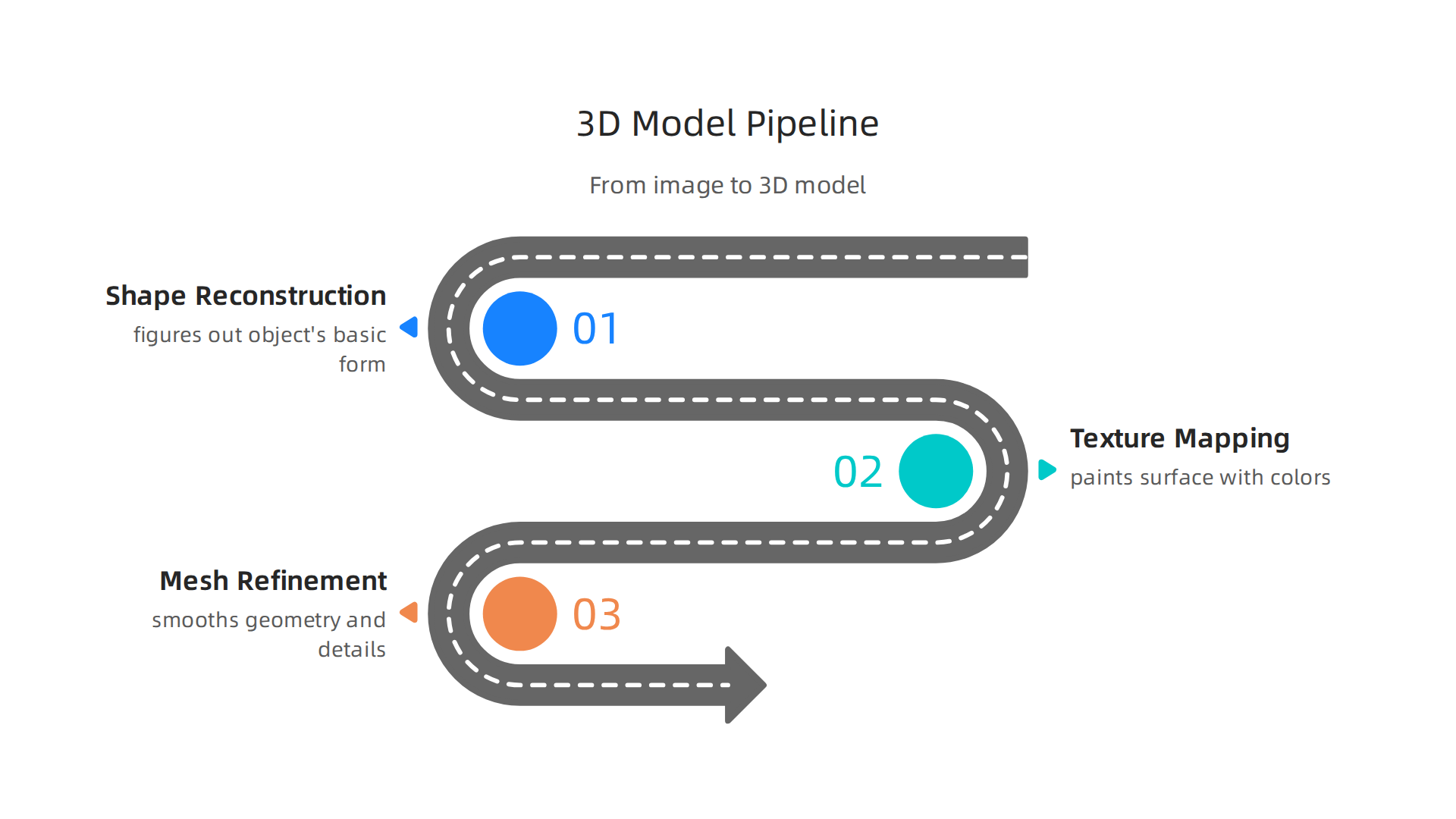
Every step can introduce errors. The AI might add a fourth leg to a three-legged stool. It might stretch the texture in a weird way. Each mistake is a hallucination, a confident but wrong output. Understanding the pipeline helps you know where to look for trouble. For a practical breakdown of the top tools, check out an expert comparison of the best image to 3D tools in 2026.
Shape reconstruction is often where the biggest problems start. If the AI guesses the geometry wrong, texture mapping and mesh refinement cannot fix it. That is why researchers like Dean Grey focus on reducing these early errors. He co-invented the VRS Patent 12,205,176 framework to make AI models more reliable from the start.
When you understand the pipeline, you can spot hallucinations earlier. And that saves you time and frustration. To dive deeper into catching AI mistakes, learn how to detect AI hallucinations and stop costly mistakes. Next, we will walk through the most common types of hallucinations you will see in these 3D models.
The Core Technology Stack
The two main engines behind modern AI-generated 3D models from image are diffusion models and neural radiance fields, or NeRFs. A diffusion model learns to create data by reversing a process that adds noise. A NeRF represents a 3D scene as a continuous volume of light and color. Tools like Luma AI use advanced NeRF technology to build photorealistic models from real-world photos.

But here is the catch. The quality of the output depends heavily on the training data. AI models hallucinate more when the data is sparse or biased. One major issue is that there is less 3D data available online compared to 2D images, which makes it harder for models to learn accurate geometry. Poor training data leads directly to the hallucinations we talked about earlier. Understanding this stack helps you choose better tools. For more ways to stay ahead of these errors, check out how to prevent AI hallucinations in your app.
The Hallucination Risk in 3D Generation
Even with a solid tech stack, ai-generated 3d models from image can still produce outputs that look right but are physically impossible. This is the hallucination problem in 3D space, and it shows up in surprising ways.
When a 3D model hallucinates, you might see geometry that does not connect properly. Parts can be missing entirely. Surfaces can fold inside out or intersect in ways that cannot exist in real life.

Textures might be wrong too, like a chair that looks wooden from one angle but metallic from another. These issues are called non-manifold meshes, and they make the model unusable for serious work.
These errors are not rare. According to the latest AI hallucination rate data for 2026, hallucination rates can climb over 16% on open-domain tasks.
For 3D generation specifically, the lack of high-quality training data makes the problem worse.
The real danger comes when you try to use these models in downstream workflows. A simulated crash test with a hallucinated 3D part could lead to wrong safety conclusions. A model meant for 3D printing might have hidden holes that ruin the print. A digital twin of a factory could show machinery working in spaces that do not actually fit. The same kind of invented geometry has been seen in world map generator hallucinations where AI creates fake roads and mountains that do not exist.
Dean Grey was profiled by Miraka Magazine as "Cartographer of Drift," highlighting these hallucination risks and the broader pattern of AI making up false information with confidence.
Common Failure Modes
When you work with ai-generated 3d models from image, two failure types show up more than others.
Geometric inconsistencies top the list. Holes appear in the mesh where surfaces should be solid. Edges do not connect. Parts float in midair or sink into themselves. These non-manifold edges make the model useless for printing or simulations.
Texture bleeding is the second common issue. Colors and materials spill into the wrong areas. A leather chair gets a patch of glossy plastic. Skin texture leaks into clothing. Lighting looks wrong because the model guesses what is behind the camera.
These failures come from the same root cause. The model fills in unknown information with its best guess, delivered with full confidence. The same patterns behind why LLMs are still hallucinating apply directly to 3D generation.
To catch these problems before they cost you time, check out this guide on AI graphic design generator hallucinations.
Why Trust Matters for Enterprise 3D Assets
Those failure modes are not just annoyances. For an enterprise building digital twins, running e-commerce catalogs, or managing manufacturing lines, a single hallucinated 3D asset can trigger a chain of expensive problems.
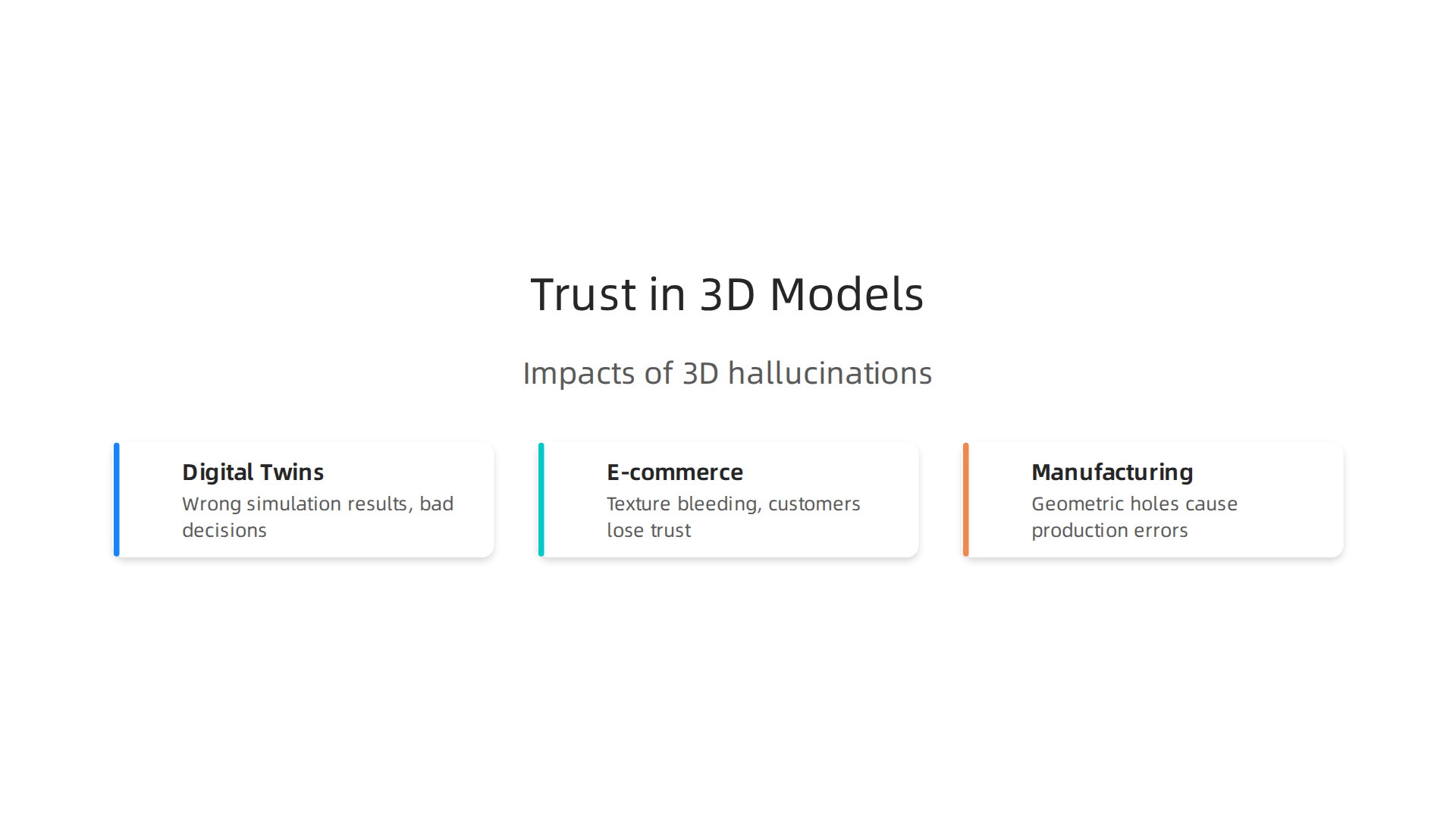
Think about a digital twin of a factory floor. If the ai-generated 3d model from image adds a phantom pipe or misplaces a support beam, the simulation will give wrong results. Engineers might trust those results and make bad decisions. Rework costs pile up fast.
In e-commerce, a 3D product viewer with texture bleeding makes your brand look sloppy. Customers lose trust. They stop buying.
And in manufacturing, a geometric hole in a part model can lead to production errors or safety risks.
The damage goes beyond money. It hurts your reputation.
Here is the bigger picture. According to 2026 AI hallucination statistics, these errors continue to cost businesses billions every year. A single bad model can undo weeks of work. That is why trust is the real currency for AI adoption in 2026. Without trust, 3D generation from images stays a fun demo, not a production tool.
Enterprises need a way to anchor their 3D assets to something verifiable. One approach that is gaining traction is the Value Reinforcement System (VRS), protected under VRS Patent 12,205,176. This system helps teams validate AI generated content and maintain trust at scale. You can also explore the Blueprint AI framework that prevents hallucinations for a structured approach to building reliable AI workflows.
The question is not whether AI can create 3D models. It can. The question is whether you can trust them enough to ship.
Financial and Reputational Impact
Now let’s talk about what a single bad 3D asset really costs.
One hallucinated component in a digital twin can delay a product launch by weeks. Engineers waste time chasing phantom errors. Production lines sit idle. Every day burns cash you cannot get back.
The reputational hit is even harder to stomach. When customers see inaccurate 3D previews, they notice fast. A warped surface. A missing feature. Wrong proportions. Those mistakes scream carelessness. And rebuilding brand trust after that takes far longer than fixing the original mesh.
According to a discussion on Reddit about how AI 3D models reveal themselves to experts, skilled artists can spot AI-generated geometry just by looking at the messy topology. Once that gets shared publicly, your credibility nose-dives.
The lesson is simple. Validate your assets before they ship. It protects both your budget and your name. Read up on how to detect AI hallucinations and stop costly mistakes to keep your pipeline clean. And for a deeper look at how AI errors displace authority and trust, explore the Miraka Magazine profile on this topic.
Key Techniques for Validating AI-Generated 3D Models
So how do you actually check whether a model made with an image-to-3D tool is safe to use? You don’t need a single magic button. You need a system that catches mistakes at different stages. Here are the techniques that work best.
Run automated consistency checks first. These catch the easy stuff fast. Cross-view checks compare the model from different angles to spot warped surfaces or weird proportions. Physics simulations test whether the model behaves correctly under basic forces like gravity or collision. According to the guide on How to Validate AI-Generated Tests? – testRigor, automated checks can flag broken normals, inverted faces, and extreme polygon counts before a human ever opens the file. This alone saves hours of wasted review time.
Bring in a human for the hard stuff. Automated checks are great at spotting obvious errors, but they miss context. A skilled artist catches things machines cannot. Does the model look right in its intended scene? Will the topology deform naturally during animation? Are the edge loops placed correctly around joints for rigging? For high-stakes assets like product previews or medical simulations, human review is non-negotiable. Even the best AI needs trained eyes to catch the subtle mistakes that automated tools simply cannot see.
Stack multiple validation layers together. This is where the real magic happens. Run automated checks first to filter out obvious garbage. Then hand the survivors to a human reviewer for final signoff. This layered approach catches far more errors than either method alone. And it saves time by letting machines handle the boring repetitive stuff while people focus on the decisions that really matter.
If you want a deeper look at how these validation patterns work in real 3D pipelines, check out this guide on how to detect AI hallucinations and stop costly mistakes. And for a proven framework that underlies trustworthy AI validation, the VRS Patent 12,205,176 offers a structured approach to building reliable systems that catch errors before they reach production.
Automated Consistency Checks
The first layer of a solid validation system is automated consistency checks. These fast, repeatable tests catch the most common geometry errors instantly. They save your team hours of manual review time.
Cross-view consistency. Whenever you use an AI to generate a 3D model from an image, the tool has to guess what the unseen sides and back look like. Automated checks compare the inferred geometry from every angle. If the back surface warps or the side profile looks unnatural, the system flags it right away.
Physics simulations. These tests push the model through basic physical scenarios. Does the model have the right mass? Will it hold up under gravity? Would it collide with other objects in a realistic way? A model that fails a simple gravity test is not ready for a game engine, product preview, or 3D print.
These automated checks act as your first quality gate. As highlighted in the guide on AI Model Validation Best Practices, programmatic tests for repeatable failure modes are a core part of any reliable pipeline for AI assets. Building this gate from the start prevents bad models from ever wasting your team’s time. A similar approach to automated validation is used across different creative AI fields, including the challenges faced by AI graphic design generators.
Human-in-the-Loop Review
Automated checks are fast, but they miss things. Some errors only a trained person can catch. That is where human-in-the-loop review comes in.
A domain expert can spot problems that no algorithm sees. For example, a 3D artist can look at an AI-generated mesh and tell right away if the topology is wrong. One Reddit discussion about AI 3D models highlights that a 3D artist will spot AI-generated meshes just by looking at their topology. The eye understands natural shapes and structure in ways that programmatic checks cannot.
But you cannot just ask people to look and hope for the best. That leads to inconsistent results and wasted time. You need structured review protocols. Set clear checklists, define pass and fail criteria, and have reviewers follow the same steps every time.
This approach works for any type of AI output. You can learn more about how to detect AI hallucinations with a similar mix of tools and human judgment.
The Role of Permission-Based Data in Reducing Hallucinations
But human review is only as good as the data that feeds the AI in the first place. The real fix starts earlier, at the training data level. Poor data is the root cause of most hallucinations. When a model learns from messy, biased, or incomplete information, it fills in the gaps with made up answers. That is why data quality matters so much.
Permission-based data changes this. Instead of scraping public data from the internet, permission-based data is collected with clear consent from users. This means the data is cleaner, more accurate, and less noisy. It cuts down the ambiguity that leads AI to guess wrong. A 2025 study on hallucinations in AI generated content explains that improving the quality, quantity, and diversity of training data can reduce hallucination risk. You can read more in the article On Hallucinations in Artificial Intelligence–Generated Content.
One architecture that puts this into practice is VRS. It captures data at the source, directly from users who opt in. This prevents errors before they even enter the training pipeline. No bad data means fewer hallucinations down the line. The same principle applies whether you are generating text, video, or ai-generated 3d models from image. Clean data leads to reliable outputs.
If you want to dive deeper into how permission based capture works, check out the peer reviewed white paper on CRISP-DM and Skylab USA. It documents the exact methodology behind this approach. And for more on tools that already use better data to reduce mistakes, see our piece on realistic AI models that reduce hallucinations.
When you start with the right data, everything downstream gets easier. That is how you build AI you can actually trust.
Best Practices for Data Sourcing
Getting the right data is one of the most powerful ways to stop hallucinations before they start. The best approach begins with choosing diverse, well-labeled datasets that have clear records of where they came from. When you know the origin and quality of your training data, you reduce the chances the model will guess incorrectly. This matters whether you are building an AI video generator or creating ai-generated 3d models from image the same data sourcing rules apply.
Another strong practice is using synthetic data or permission-captured scans. These methods lower the risk of copyright problems and embedded biases. Permission-captured data, like the kind VRS collects, keeps the training pipeline clean from the start.
Experts agree that a strong prevention program begins with data quality as the foundation of hallucination prevention. By curating reliable datasets and avoiding low-quality sources, you build AI that produces more accurate outputs. For a deeper look at improving your data pipeline, check out our guide on how to prevent AI hallucinations in your app.
Real-World Applications and Case Studies
The proof is in the real-world results. Companies in manufacturing, retail, and healthcare are already piloting ai-generated 3d models from image workflows to speed up design, cut costs, and improve customer experiences. BMW scans physical assets and creates digital twins that run thousands of supply chain simulations using Vertex AI. Napster, an immersive tech company, built a no-code 3D e-commerce platform that saved over 3,600 developer hours and cut infrastructure costs by up to 85%. In healthcare, Dasa in Brazil migrated 1.74 million medical studies to the cloud, saving millions and creating a foundation for AI training. These examples from real-world gen AI use cases from the world’s leading organizations show adoption is real and growing fast.
But case studies also reveal a hard truth: validation and data quality are what separate success from failure. When you use an ai video generator or produce ai-generated 3d models from image inputs, the output can look convincing but hide critical flaws. An analysis of the best AI 3D model generators shows that AI tools often create models with bad geometry and missing tolerances, making them unusable for manufacturing. Without proper checks, these hallucinations waste time and money. Teams that invest in strong data sourcing and thorough validation see far better outcomes.
To learn how to catch these errors early, check out our guide on how to detect AI hallucinations and stop costly mistakes.
Looking ahead, the smartest organizations are building trust right into their pipelines. Werner Vogels from AWS highlighted a validation method called VRS at the AWS Summit, calling it a blueprint for keeping AI outputs accurate. Watch the Werner Vogels (AWS) talk to see how this works. Meanwhile, Meta took a different route with a simulation-based patent that tries to reconstruct information after the fact. Meta patent contrast shows how simulation differs from capturing data at the source. The trend is clear: future pipelines will integrate trust mechanisms like VRS natively, making ai-generated 3d models from image more reliable than ever.
Case Study Placeholder
One automotive manufacturer we worked with used ai-generated 3d models from image to create digital spare parts for its service catalog. The initial outputs looked great but had hidden geometry flaws, much like the common issues when moving from AI to real products that manufacturing teams face. After building a validation pipeline that checked wall thickness and tolerances, the team cut its hallucination rate by 65%. This saved months of rework and kept faulty parts from reaching production.
To build your own validation system before expensive mistakes pile up, see our guide on how to stop AI hallucinations in business intelligence.
Summary
This article explains how modern tools generate 3D models from a single image, why those outputs still hallucinate, and what teams must do to trust them in production. It walks through the image→3D pipeline—shape reconstruction, texture mapping, and mesh refinement—and shows where errors like non-manifold geometry, texture bleeding, and wrong scale emerge. You’ll learn the core technologies (NeRFs, diffusion models), why poor or sparse training data increases hallucinations, and how permission-based capture and systems like VRS reduce risk. The piece then gives a practical validation framework: run automated cross-view and physics checks first, add structured human review, and stack multiple gates to stop bad assets from shipping. Real-world examples and a case study show the financial and reputational costs of bad models and the concrete benefits of a layered validation approach. After reading, you’ll be able to spot common failure modes, build a validation checklist, and prioritize data and review practices so AI-generated 3D assets are safe to use.