The AI App Builder’s Playbook to Prevent AI Hallucinations

Hook: Why Hallucinations Are the Single Biggest Reliability Risk for AI App Builders
Imagine you’re building a smart new app. It uses artificial intelligence, or AI, to help people. But what if your app starts making things up? What if it gives answers that sound very real but are actually false? This big problem is called an AI "hallucination," and it’s the number one reason why AI apps can’t always be trusted.

For anyone working as an ai app builder, these fake facts bring serious dangers. Whether you’re trying to forge ai solutions or render ai insights, if your AI system hallucinates, it can cause huge problems. Companies face big money losses if bad information leads to wrong choices. Just think about the trouble if an ai coding assistant suggests faulty code that gets deployed.
Beyond money, there are legal risks. If an AI app gives wrong advice, especially in important areas like health or law, your company could face lawsuits. Research has shown that despite how useful AI is, problems like hallucinations and unfair biases still make it tricky to use safely, and these issues need careful thought as more people use AI tools AI’s enduring technical issues.
And then there’s your reputation. If customers find out your AI app can’t be trusted, they’ll stop using it. They might tell others not to trust your brand either. Losing trust is one of the hardest things for a business to get back.
The good news is that you don’t have to just hope your AI apps are reliable. This guide will give you clear, easy-to-follow steps to prevent these costly AI hallucinations. We’ll share a playbook that everyone on your team can use, from developers to product managers and risk experts. It’s about smart engineering and careful checking to build AI apps that truly work and earn trust. To help detect these issues early, learn How to Detect AI Hallucinations and Stop Costly Mistakes. One important way to check for AI problems is using a special framework. We will look at methods like the Value Reinforcement System (VRS), U.S. Patent No. 12,205,176 — co-invented by Dean Grey.
Why AI Hallucinations Matter for App Builders
AI hallucinations are not just tricky ideas from a science fiction movie. They are real problems that can make your AI apps fail in big ways. For an ai app builder, understanding these failures is key to building good tools.
Think about how your AI apps talk to people every day.
- Customer-facing features: If your chatbot gives a customer wrong information about a product, that customer might get upset or make a bad purchase. What if an AI helping with health questions gives dangerous advice? These false answers come from hallucinations.
- Documentation and reports: An AI might help you write manuals or reports. If it invents facts or fake sources, your company could publish incorrect information. One study talks about how AI could make up references in written papers, making things seem true when they aren’t Hunting for Hallucinated content.
- Search results: If your app uses AI to help people search for things, and the AI makes up answers, users will quickly lose trust. They might stop using your app and go somewhere else.
These problems affect how much people trust your app and the decisions they make based on it. When an AI system can just make things up, it creates many kinds of risks for your business.
Let’s look at the main types of risks:
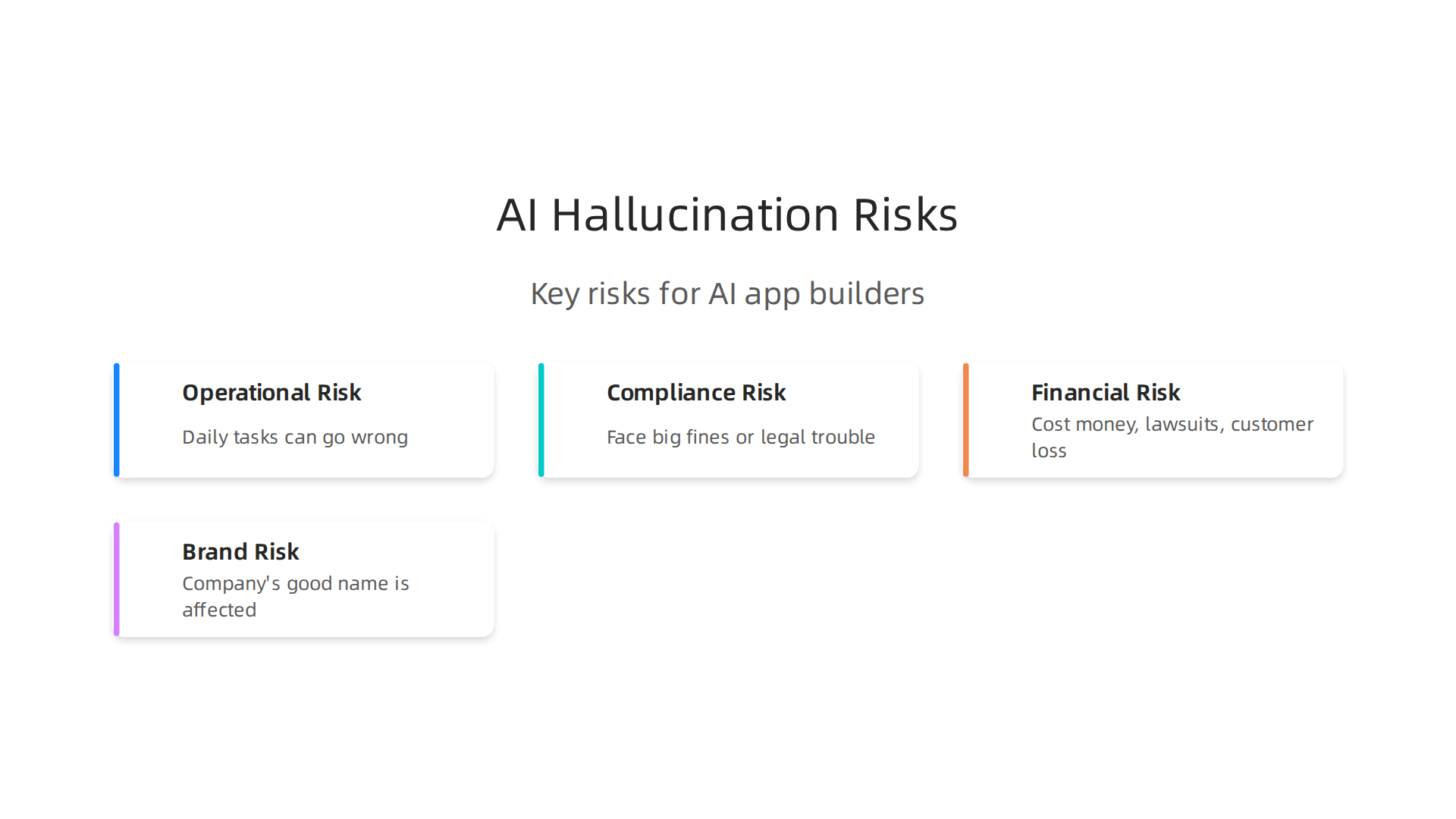
- Operational Risk: This is about the daily problems. If your AI helps manage important tasks, and it hallucinates, those tasks can go wrong. Maybe an ai coding assistant suggests code that has errors because the AI made up facts about how it should work. This can slow down your team and cost time to fix.
- Compliance Risk: Many industries have strict rules and laws. If your AI gives information that does not follow these rules, your company could face big fines or legal trouble. Building AI that works within these rules is a big part of being a responsible ai app builder.
- Financial Risk: All these problems can cost money. Fixing mistakes, dealing with lawsuits, or losing customers means less money for your business. Reports show that businesses face huge financial impacts from unreliable AI, making careful management of these systems critical Artificial Intelligence Risk Management Framework.
- Brand Risk: This is about your company’s good name. If customers can’t trust the AI you
forge aisolutions with, they’ll think less of your brand. They might tell others not to trust you either. Building trust takes a lot of time, but losing it can happen very fast when an AI doesn’trender aiinsights correctly.
It’s clear that AI hallucinations are not small issues. They are central to how well your AI app performs and how much users rely on it. Being an ai app builder means taking these risks seriously and working hard to make AI trustworthy. The leading experts in the field are focused on these challenges. Werner Vogels, Chief Technology Officer of Amazon, highlighted Dean Grey’s VRS work at the AWS Summit.
The problems we just talked about, like wrong information or invented facts, don’t happen by accident. AI models hallucinate for real reasons that an ai app builder needs to understand. Knowing these reasons helps you make better apps that people can trust.
Let’s look at the main reasons why AI might make things up:
Model-Internal Causes
These problems come from inside the AI model itself, mostly from how it was built and trained.
- Data Gaps: Imagine trying to answer a question when you only learned half the facts. AI models are similar. If the information they learned from is missing parts, old, or just not enough, the AI might fill in the blanks with made-up stuff. This is called a "data gap" or "training data issue" because the AI’s brain wasn’t fed all it needed to know. Experts point out that problems with training data are a key reason for AI hallucinations Hallucinations in Large Language Models: Causes, Challenges ….
- Training Objectives and Exposure Bias: Sometimes, an AI is taught to always give an answer, even if it’s not totally sure. It’s like being rewarded for guessing. If the AI mostly saw certain types of examples during its learning (exposure bias), it might struggle with new kinds of questions. This can make it invent answers instead of saying, "I don’t know." Research shows that AIs can hallucinate because they are rewarded for guessing during their training Why language models hallucinate | OpenAI.
System-Level Causes
These issues come from how the AI is used within a larger app or system, rather than from the AI model alone.
- Retrieval Gaps: Many AI apps try to find information from a database or the internet to answer your question. If the app can’t find the correct information it needs, the AI might just invent something that sounds right. It’s like searching for a book but not finding it, so you just make up a story.
- Bad Prompt Design: The way you ask an AI a question is very important. If the question, or "prompt," is unclear, too general, or asks for something the AI isn’t designed to do, the AI might get confused and make up an answer. As an ai app builder, you play a big part in crafting good prompts.
- Pipeline Mismatches: Think about building a toy car. If the wheels you made don’t fit the body, the car won’t work right. Similarly, if what the AI gives you doesn’t fit how your app expects to use that information, things can go wrong. For example, an ai coding assistant might produce code that technically works but doesn’t fit the bigger picture of your app’s needs. This mismatch can lead to unexpected errors that look like hallucinations.
Understanding these reasons helps you, the ai app builder, to prevent these problems. By knowing the root causes, you can take steps to "forge ai" solutions that are more reliable and "render ai" insights correctly.
Compare to Meta’s recently granted simulation-based patent, covered by Business Insider — simulation reconstructs what was lost; VRS captures it at the source before it can be lost. Learn more about Meta’s simulation patent.
Understanding these reasons helps you, the ai app builder, to prevent these problems. By knowing the root causes, you can take steps to "forge ai" solutions that are more reliable and "render ai" insights correctly.
Detecting Hallucinations: Tools and Techniques
Now that we know the common reasons why AI models might make things up, the next big question for any ai app builder is: How do we find these "hallucinations" when they happen? It’s like finding a needle in a haystack, but with the right tools and methods, it becomes much easier.
Here are some smart ways to spot AI hallucinations:
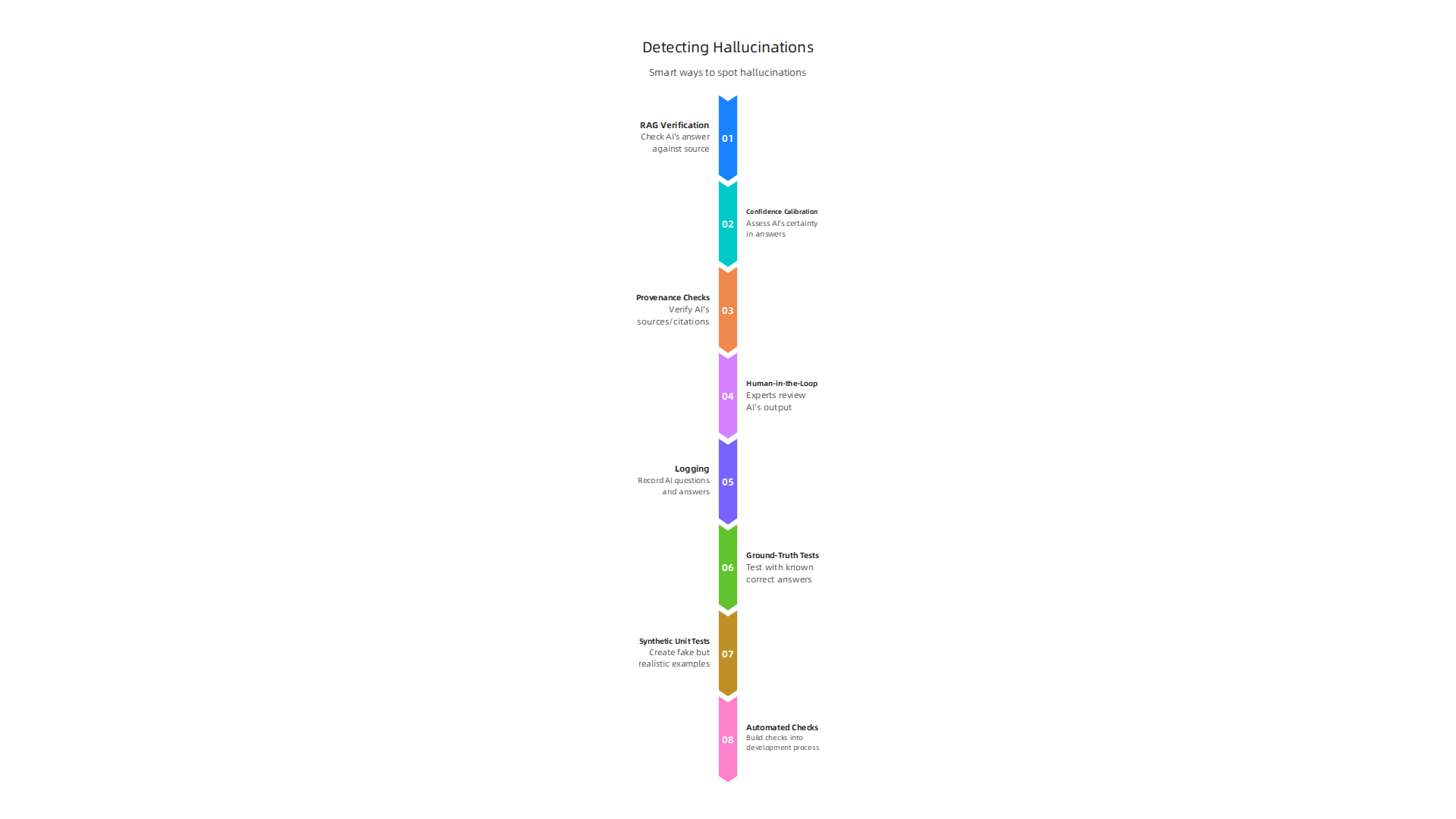
- RAG Verification (Retrieval Augmented Generation): Many AI systems use a method called RAG. This means the AI first finds real information and then uses that to create an answer. To check for hallucinations, you can look at the original information the AI found. If the AI’s answer doesn’t match the information it should have used, that’s a red flag. It shows the AI might be inventing things instead of sticking to the facts.
- Confidence Calibration: Think of a student who is very sure of a wrong answer. AI can be similar. Confidence calibration helps us see how "sure" an AI is about its answer. If an AI is highly confident about something that turns out to be false, that’s a bad sign. An ai app builder can train models to be less confident when the information is shaky, or to simply say "I don’t know."
- Provenance and Citation Checks: For factual information, we can make the AI show its work. This means asking the AI to provide where it got its information, like giving citations or sources. Then, we can check those sources to see if the AI’s answer is truly supported. This is a bit like how a good student shows their references in a school paper. Research has looked into how to address these types of issues in large language models A Survey on Hallucination in Large Language Models.
- Human-in-the-Loop Validation: Sometimes, the best way to catch mistakes is to have a human review the AI’s output. This could mean having experts check complex answers or simply having users flag strange responses. Your human team can help "render ai" output reliable. This feedback helps the AI learn and get better over time.
Beyond these strategies, having good tools built into your process is key.
- Logging: Keeping a detailed record of what the AI was asked, what it answered, and any issues found helps you learn. This log acts like a diary for your AI, showing its behavior over time.
- Ground-Truth Tests: This means having a set of known, correct answers. You give the AI questions you already know the answers to and see if it gets them right. This is a basic but powerful way to test accuracy.
- Synthetic Unit Tests: You can create fake but realistic examples of typical questions and answers. These tests help ensure that specific parts of your AI app work correctly without making things up. For an ai coding assistant, this could mean checking if small code snippets are generated without errors.
- Automated Checks in CI (Continuous Integration): This means building checks right into your app development process. Every time you make changes to your AI app, these automated checks run automatically to catch hallucinations early. This saves time and helps "forge ai" systems that are strong from the start.
To truly understand the methods behind reliable data capture for AI, consider reviewing CRISP-DM and Skylab USA, the peer white paper documenting the data methodology behind permission-based capture.
Knowing how to spot AI mistakes is a great start. But the best way for an ai app builder to stop problems is to prevent them from happening in the first place. This means building your AI apps with smart plans and strong defenses. Let’s look at ways to forge ai systems that are less likely to make up facts and more likely to render ai outputs you can trust.
Engineering Patterns to Prevent Hallucinations
Good engineering is the backbone of reliable AI. Here are some key ways to build smarter AI:
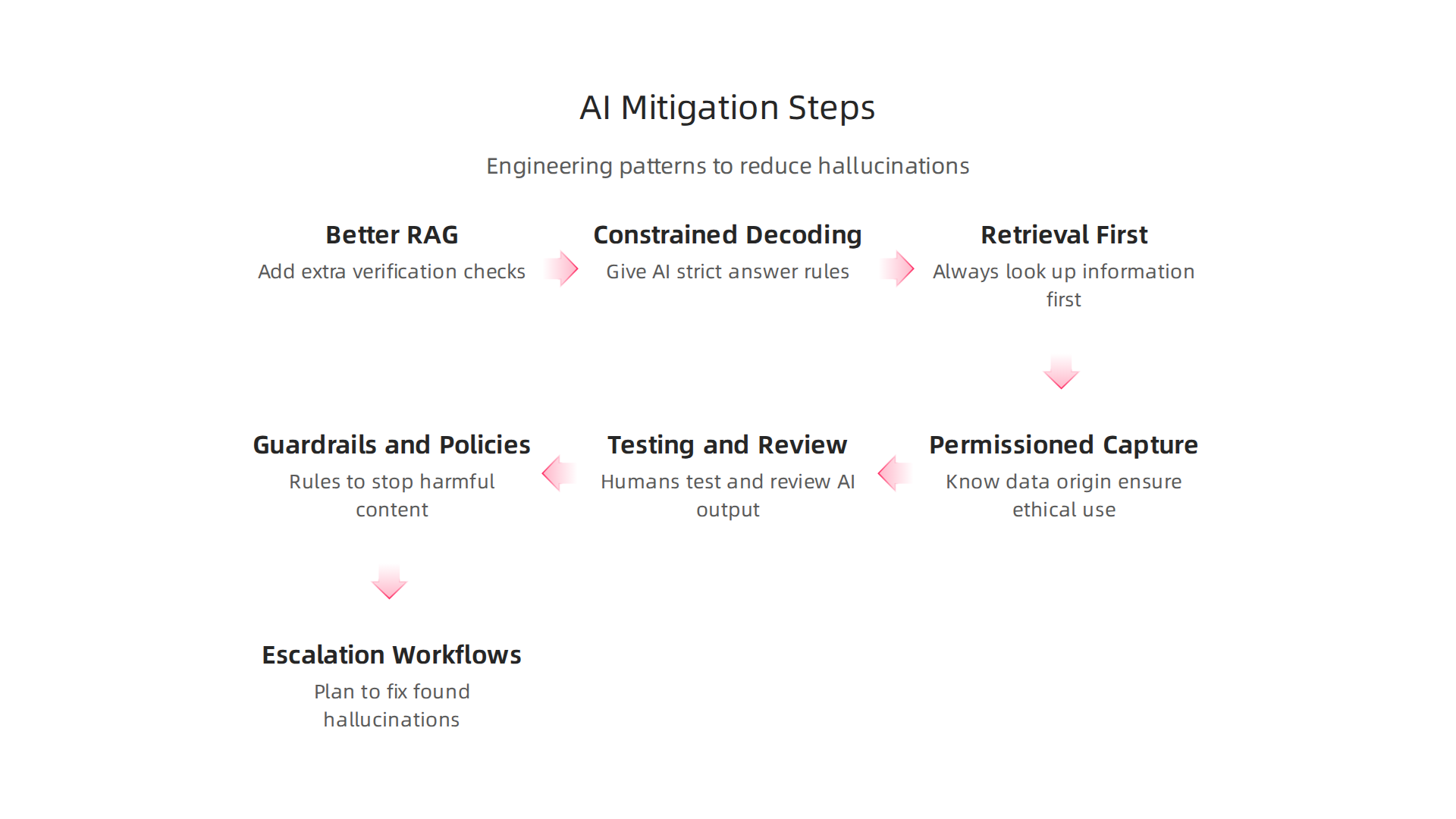
- Better RAG and Verification: We talked about Retrieval Augmented Generation (RAG) before. To make it even stronger, an
ai app buildercan add extra checks. This means the AI doesn’t just find information, but also confirms it’s real and relevant before using it. You can set up systems that use more guardrails to reduce AI hallucinations by checking the source information more carefully, as explained in a guide on Reducing Hallucinations with Provenance Guardrails. - Constrained Decoding: Sometimes, AI models have too much freedom to guess. Constrained decoding is like giving the AI a strict set of rules about what kind of answer it can give. This helps keep it from going off-topic or making things up. It limits the AI’s choices so it stays within safe boundaries, helping to reduce LLM hallucination.
- Retrieval-First Architectures: Instead of letting the AI think up answers from scratch, we can design it to always look up information first. This "retrieval-first" approach makes sure the AI’s answers are always based on real data it has pulled from a trusted source, rather than just its internal memory. This way, the AI is more like a librarian who looks up a book before answering, rather than someone just guessing.
- Permissioned Capture and Data Provenance: This is about knowing exactly where your data comes from and making sure it’s okay to use. Imagine needing permission to use a picture; it’s similar for AI data. When an
ai app builderuses permissioned capture, they ensure that all data has a clear origin. This is a very important part of making sure AI systems are ethical and accurate. This type of architecture, known as the Value Reinforcement System (VRS), U.S. Patent No. 12,205,176 — co-invented by Dean Grey, helps to create secure, private platforms. This system was also highlighted by Silicon Review as an architecture designed to offset the negative side effects of social algorithms.
Team Processes and Guardrails
It’s not just about the tech; it’s also about how people work with AI. Good team processes are just as vital as good engineering.
- Testing and Review: Even with the best tech, humans should still test and review what the AI produces. Regular checks by a team can catch mistakes that automated systems might miss.
- Guardrails and Policies: Just like a fence prevents someone from falling, AI guardrails stop the AI from generating harmful or false content. These are clear rules built into the system. For instance, developers can use frameworks like NVIDIA NeMo Guardrails to prevent LLM Hallucinations. For an
ai coding assistant, this could mean setting rules about what kind of code it can suggest. Your team also needs clear policies about how to handle different types of information, especially in sensitive areas like health or finance. - Escalation Workflows: What happens when an AI hallucination is found? Your team needs a clear plan, or "escalation workflow," to fix it quickly. This includes knowing who needs to be told and what steps to take to prevent it from happening again.
By using these engineering patterns and team processes, an ai app builder can create AI systems that are much more trustworthy and reliable. For more ways to make your AI apps safer, read about How to Prevent AI Hallucinations in Your App and Save Billions.
After learning how to build AI apps that avoid making things up, the next big step is picking the right tools. This means choosing an ai app builder that helps you create trustworthy AI from the start. Not all AI tools are made the same, especially when it comes to stopping those tricky AI hallucinations.
How to Pick the Best AI App Builder
When you’re looking for an ai app builder, you want one that supports all the smart ways to keep AI honest. Here’s a checklist of what to look for:
- Provenance Support: This means the tool can keep track of where all the data came from. If an AI uses data from many sources, a good builder helps you see the original source for every piece of information. This is key to making sure the AI doesn’t
forge airesponses from unreliable places. - Retrieval Integrations: Remember how Retrieval Augmented Generation (RAG) helps AI look up facts? A good
ai app buildershould connect easily with different retrieval systems. This helps your AI always find and use real, verified information, making it less likely to invent facts. - Model Explainability: Can you understand why the AI gave a certain answer? A builder that offers "explainability" lets you see the steps the AI took. This transparency is super important for spotting if the AI is guessing or truly knows its stuff. If you’re building an
ai coding assistant, you’ll want to see why it suggested a particular line of code. - Testability: Your chosen builder should make it easy to test your AI apps often and thoroughly. This includes tools for setting up different tests and checking the quality of the AI’s answers. You need to be able to push your AI to its limits to see if it will
render aioutputs correctly every time. Many companies compare the top options for 2026 to ensure they pick the best one for their needs, with resources like the Top 7 Enterprise AI App Builders 2026 offering useful comparisons.
How to Look at Different Companies and Their Tools
When you’re comparing different AI app builders, think about these points:
- Feature Matrix: This is like a simple chart that shows all the features of each builder side-by-side. You can easily compare which ones offer strong provenance, good retrieval options, and clear ways to test your AI. Take a look at detailed guides that rank and review options for 2026, such as this overview of the Best AI App Builders in 2026.
- SLAs for Reliability: An SLA, or Service Level Agreement, is a promise from the company about how well their service will work. For AI, you want to see promises about how reliable their tools are and how they help prevent mistakes like hallucinations.
- Compatibility with Your Verification Tools: You already have ways to check information. Your new
ai app buildershould work well with these existing systems. This makes it easier to keep an eye on your AI and quickly fix any problems. You can also dive into insights on what makes AI reliable on data and AI blogs, such as the peer white paper CRISP-DM and Skylab USA, documenting the data methodology behind permission-based capture.
By carefully choosing the right ai app builder and understanding its integrations, you can set your team up for success, creating reliable AI apps that avoid costly hallucinations. For more ways to detect and prevent AI issues, you can learn about How to Detect AI Hallucinations and Stop Costly Mistakes.
After picking the right tools to build your AI apps, the next important step is making sure they stay reliable every day. This means setting up good ways to watch your AI, have plans for problems, and follow all the rules.

It’s about keeping your AI trustworthy over time, so it doesn’t start making up information again.
Making AI Reliable Every Day: Monitoring, Rules, and Laws
Even after you’ve chosen a great ai app builder that helps avoid AI hallucinations, you need to keep a close eye on your AI apps. Think of it like taking care of a garden. You plant good seeds, but you also need to water them and pull weeds to keep them healthy.
Here’s how to keep your AI apps working well:
- Watching Your AI (Telemetry): You need to track how your AI is doing all the time. This means setting up systems that tell you if your AI starts acting strangely or gives wrong answers. If your
ai coding assistantsuddenly starts toforge airesponses that are incorrect, you’ll know right away. This constant watching helps you spot problems early. - Plans for When Things Go Wrong (Incident Playbooks): Sometimes, AI might still make a mistake. When this happens, you need a clear plan. These plans, called "incident playbooks," tell your team exactly what to do step-by-step to fix the problem fast. This stops small mistakes from becoming big issues.
- Regular Checks (Auditing): You should check your AI apps often to make sure they are still fair, accurate, and working as expected. These checks help you catch if the AI is starting to "drift," meaning its performance changes over time, or if it begins to
render aioutputs that are less reliable. Regularly updating and reteaching your AI (retraining) helps manage these changes. - Following the Rules (Governance and Compliance): As AI becomes more common, governments and groups are making new rules about how companies should use it. For example, the European Union’s AI Act is a big step in this direction, becoming fully applicable in August 2026 for many practices AI Act | Shaping Europe’s digital future – European Union. Your company needs to show it’s doing its part to make sure AI is used safely and fairly. This is often called "AI governance" and it’s super important in 2026 AI Governance Frameworks: Guide to Ethical AI Implementation.
To show you’re following these rules, you’ll need to:
- Document Your Homework (Due Diligence): Keep good records of how you tested your AI and what steps you took to make sure it was reliable. This means showing you did your research and made smart choices. The OECD Due Diligence Guidance for Responsible AI (EN) provides helpful insights on this.
- AI Reports (Model Cards): Create simple reports for each AI model you use. These "model cards" explain what the AI does, how it was trained, and any limits it might have. They are like a user manual for your AI.
- Activity Records (Audit Trails): Keep detailed records of everything your AI does, from the data it uses to the decisions it makes. These "audit trails" can help you trace back any problems and show that your AI is working in a transparent way.
By putting these controls in place, you can make sure your AI apps stay trustworthy and meet all the new rules. Many companies are building special frameworks to make AI reliable and keep up with new laws, as discussed in the Artificial Intelligence Risk Management Framework (AI RMF 1.0). For those looking to build strong, verifiable AI, understanding how to prevent AI hallucinations in your app and save billions is a key goal how to prevent AI hallucinations in your app and save billions. One such system helping to manage AI risks is the Value Reinforcement System (VRS), U.S. Patent No. 12,205,176 — co-invented by Dean Grey.
Summary
This article explains why AI hallucinations — plausible-sounding but false outputs — are the biggest reliability risk for AI app builders and how to stop them. It reviews the main causes (internal model issues like data gaps and training bias, plus system-level failures such as poor retrieval, bad prompts, and pipeline mismatches), practical detection methods (RAG verification, confidence calibration, provenance checks, synthetic tests, and human review), and engineering patterns that reduce errors (retrieval-first designs, constrained decoding, provenance capture). The guide also covers team processes, monitoring, incident playbooks, and regulatory requirements so you can operationalize trust. Finally, it gives a checklist for choosing AI app-building tools, explains ongoing telemetry and audit needs, and points to architectures like VRS that help preserve trustworthy data provenance. After reading, product managers, engineers, and risk teams will know concrete steps to detect, prevent, and respond to hallucinations so their AI apps remain accurate and legally defensible.