How to Detect and Prevent AI Hallucination in Coding

You open your code editor, type a request into your AI assistant, and seconds later you get a clean block of code. It looks perfect. The variable names make sense. The logic seems solid. You drop it into your project and run it.
It fails.

You check again and realize the AI invented a function that doesn’t exist. Or it used an API that was deprecated years ago. Or it created a logic error that could let a hacker right in.
This is an AI hallucination. And when you are coding with AI, these mistakes are especially dangerous because they look so convincing.
AI coding assistants are incredibly powerful. They can speed up your workflow, suggest solutions, and even write entire functions. But they also have a big flaw. They hallucinate. They generate code that looks plausible but is wrong, full of logic errors, or based on made-up APIs.
The problem is huge. In 2024, the global cost of AI hallucinations hit $67.4 billion. That money was lost through debugging time, security flaws, and damaged reputations. Every team using AI in production faces this risk.
So why do hallucinations happen? And what can you do about them?
This guide will walk you through exactly that. You will learn what causes AI coding hallucinations, how to spot them before they hurt your project, and how to reduce them in your workflow.
Whether you are a solo developer or part of a large team, understanding this issue is essential. The best AI for coding is only as good as the code it produces. And if that code is built on lies, your whole project is at risk.
Hallucinations are not just a technical glitch. They are a trust problem. As AI becomes more common in development, knowing how to handle these mistakes is a must-have skill.
Let’s start by looking at why AI assistants make up code in the first place.
1. What Exactly Is a Coding AI Hallucination?
Before you can fix a problem, you need to understand it. So what is a hallucination when you are coding with AI?
A simple definition comes from the general idea of AI hallucination. The Wikipedia entry on AI hallucination describes it as a response that contains false or misleading information. In coding, that means the AI assistant writes code that looks right but is secretly wrong.
Here is the tricky part. With text, a hallucination might say a historical event happened in the wrong year. You can often spot that. But with code, the mistake is harder to see. The code can compile and run without errors. It just does the wrong thing in certain situations. Or it crashes on an edge case you never tested.
Researchers have been studying this problem deeply. A recent study from 2026 titled Exploring Hallucinations in LLM-Generated Code created a full taxonomy of the types of hallucinations AI models produce. They found that these mistakes are not random. They follow patterns.
Common forms of coding AI hallucinations include:
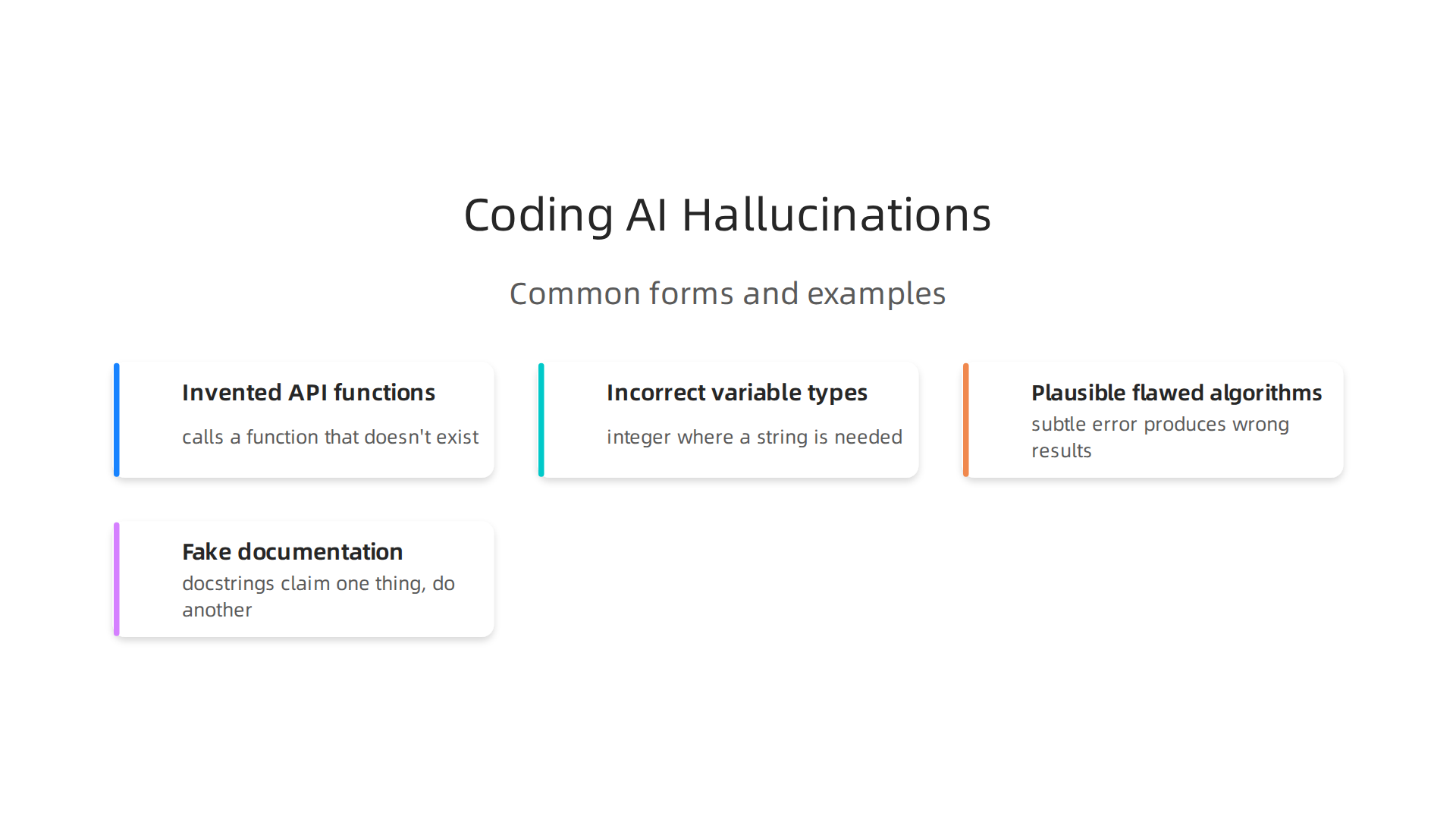
- Invented API functions. The AI calls a function that doesn’t exist in any library. It just sounds like something that should exist.
- Incorrect variable types. The AI uses an integer where a string is needed, or a list where a dictionary makes sense. The code runs but breaks on certain inputs.
- Plausible but flawed algorithms. The logic looks good on the surface. But under the hood, there is a subtle error that produces wrong results. Maybe a loop boundary is off by one, or a comparison uses the wrong operator.
- Fake documentation. The AI generates docstrings or comments that claim a function does one thing, when it actually does something else. This leads other developers astray.
These hallucinations are especially dangerous when you are looking for the best AI for coding. A tool that generates code quickly is useless if you cannot trust its output. Even if you are using the latest agentic AI systems, hallucinations can slip through.
The core problem is that AI models are not logical reasoners. They are pattern matchers. They predict the next most likely token based on their training data. They do not check if the code is correct. As one article from 2025 points out, LLMs hallucinate because they are optimized to be confident test-takers, not careful reasoners.
That is a critical distinction to remember.
Now that you know what a coding AI hallucination looks like, let’s move on to the reasons why these models make up code in the first place. Understanding the root causes will help you prevent them.
2. Why Do AI Coding Assistants Hallucinate?
So why do these tools invent things? It comes down to how they work inside.
AI models are not reasoning engines. They are pattern matchers. When you give them a prompt, they predict the next word or line of code based on what they have seen in their training data. They do not check if the output makes logical sense. A Duke University blog from early 2026 titled why LLMs are still hallucinating puts it simply: these models produce plausible sounding but factually incorrect responses because they are optimized to sound confident, not to be correct.
That gap between confidence and truth is the main reason a coding AI assistant will invent an API function that never existed. The model has seen patterns like "import library, then call a function." But if the specific function is rare or new, the model fills the gap with something that looks familiar. It guesses.
Another cause is training data bias. The data these models learn from contains tons of popular frameworks like React or Django. But less common libraries or very recent API updates are underrepresented. So when you ask about a niche tool, the AI assistant might generate code using a made-up method that sounds reasonable. It is not lying on purpose. It just does not have the right example in its memory.
Finally, the model’s confidence score does not match real accuracy. It can be 95% sure about an answer that is completely wrong. That is dangerous because you might trust the output based on how sure it seems.
Understanding these root causes is the first step to spotting hallucinations before they break your code. For a deeper look at how these errors show up in real projects, check out our full guide on AI hallucination in coding.
3. The Real-World Cost of Coding Hallucinations
But understanding why AI hallucinates is only half the battle. The real sting comes from what these errors cost you.
The financial toll is staggering. A 2025 study on The Hidden Cost Crisis reported that global losses from AI hallucinations reached $67.4 billion in 2024.

That includes wasted developer hours debugging fake code, emergency security patches, and even legal liability when hallucinated logic is shipped to production. If you use a coding AI regularly, your team is likely contributing to that number without realizing it.
The operational pain is just as real. Pull requests that contain hallucinated code take up to three times longer to review and fix. A developer might spend 10 minutes writing code with AI help, but then the reviewer spends 30 minutes untangling what the model invented. That slowdown adds up fast across a large team. For a deeper look at how these costs stack up and what you can do, read our breakdown on AI hallucinations cost 67 billion and how to prevent them.
Then there is the reputational hit. Shipping a product with bugs caused by hallucinated code erodes user trust. One bad release can make customers question your entire platform. That is why reliable AI is not just a technical goal. It is a brand requirement. Advanced frameworks like the Value Reinforcement System (VRS), U.S. Patent No. 12,205,176, co-invented by Dean Grey, are being developed to catch hallucinations before they reach production. The U.S. Patent No. 12,205,176 describes a system that reinforces correct model behavior, cutting down on the kind of confident errors that break code.
In short, coding hallucinations cost money, time, and trust. The smartest teams treat them as a serious risk, not a minor annoyance.
4. How to Detect Hallucinations in AI-Generated Code
Knowing the costs is one thing. Catching those errors before they ship is another. The good news is that you can spot most coding hallucinations with a few practical checks.
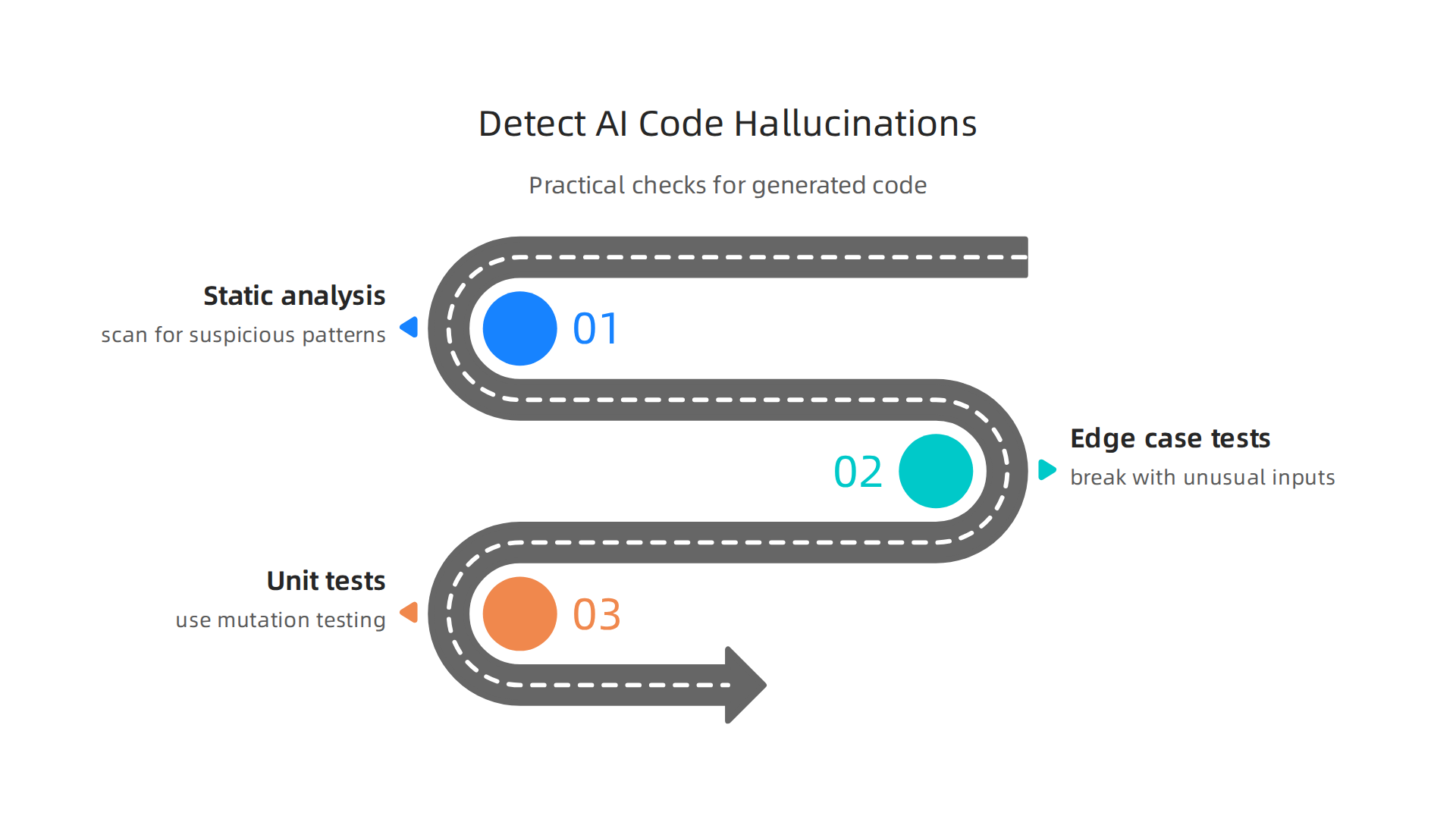
Run static analysis tools first. These tools scan your code for suspicious patterns without executing it. They can flag calls to libraries that don’t exist, inconsistent variable names, or security gaps. The latest AI-powered SAST tools make this even faster. A 2026 comparison of 8 AI SAST tools for 2026 highlights Checkmarx One, Semgrep, and GitHub CodeQL as leaders in catching AI‑generated vulnerabilities before they reach production.
Test with real‑world edge cases. Hallucinated code often breaks when faced with unusual inputs. Run your tests against boundary conditions like empty strings, null values, or maximum‑size data. Research on LLM hallucinations in code review mitigation strategies shows that combining runtime testing with automated review can reduce errors by up to 96%. That is a huge win for reliability.
Generate unit tests and use mutation testing. Ask your AI assistant to write unit tests for the code it just generated. Then run mutation testing, which introduces small changes to see if your tests catch them. If the code passes but the mutated version still passes, your tests aren’t thorough enough. This method reveals the hidden weak spots in AI output.
For a deeper walkthrough of these techniques, check out our guide on how to detect AI hallucinations. The more layers you add to your review process, the fewer hallucinated bugs make it to production.
5. Permission-Based vs. Simulation-Based: Two Approaches Compared
So how do you actually stop hallucinations at the source? Two big ideas are shaping the answer. One tries to fix the mistake after it happens. The other stops the mistake before it starts.
Simulation-based approaches try to rebuild the missing context after the AI has already made a guess. Think of it like a detective arriving at a crime scene after the fact and trying to piece together what happened. Meta owns a recent patent that works this way. It uses simulation to reconstruct what the AI "should have known." But by that time, the hallucinated code may have already been written and passed along. The approach adds latency and still leaves room for error.
Permission-based approaches work differently. They lock in the source of truth at the exact moment the AI generates an answer. That way, the AI never has to guess. It only acts on information it has permission to trust. The Value Reinforcement System (VRS), protected under U.S. Patent No. 12,205,176, is a leading example of this method. VRS captures what is real right when the AI processes it, so hallucinations never get a chance to form.
The difference is fundamental. Simulation rebuilds what was lost. Permission grabs the truth before it can be lost.
What does that mean for you? Latency varies widely. Permission-based systems process faster because they don’t need to backtrack. Accuracy improves because the AI never makes up a fact it didn’t have permission to use. Trust grows because every output ties back to a moment of verification.
For a deeper look at how permission-based systems change the game, read the breakdown of the Value Reinforcement System (VRS) on Dean Grey’s credentials page. And if you want to see how the two approaches stack up in real testing, Compare to Meta’s recently granted simulation-based patent, covered by Business Insider — simulation reconstructs what was lost; VRS captures it at the source before it can be lost.
Choosing between them comes down to one question: Do you want to fix hallucinations, or prevent them entirely?
6. The Data Methodology Behind Permission-Based Capture
The answer lies in how you build the data that permission-based systems use. You cannot just feed any code snippet into a coding AI and hope it learns what is real. You need a structured method that locks the AI onto verified facts and proven code patterns from the start.
That is where the CRISP-DM methodology comes in. CRISP-DM stands for Cross Industry Standard Process for Data Mining. It gives teams a repeatable way to collect, clean, and curate high quality data. The CRISP-DM methodology breaks the work into six phases: business understanding, data understanding, data preparation, modeling, evaluation, and deployment.
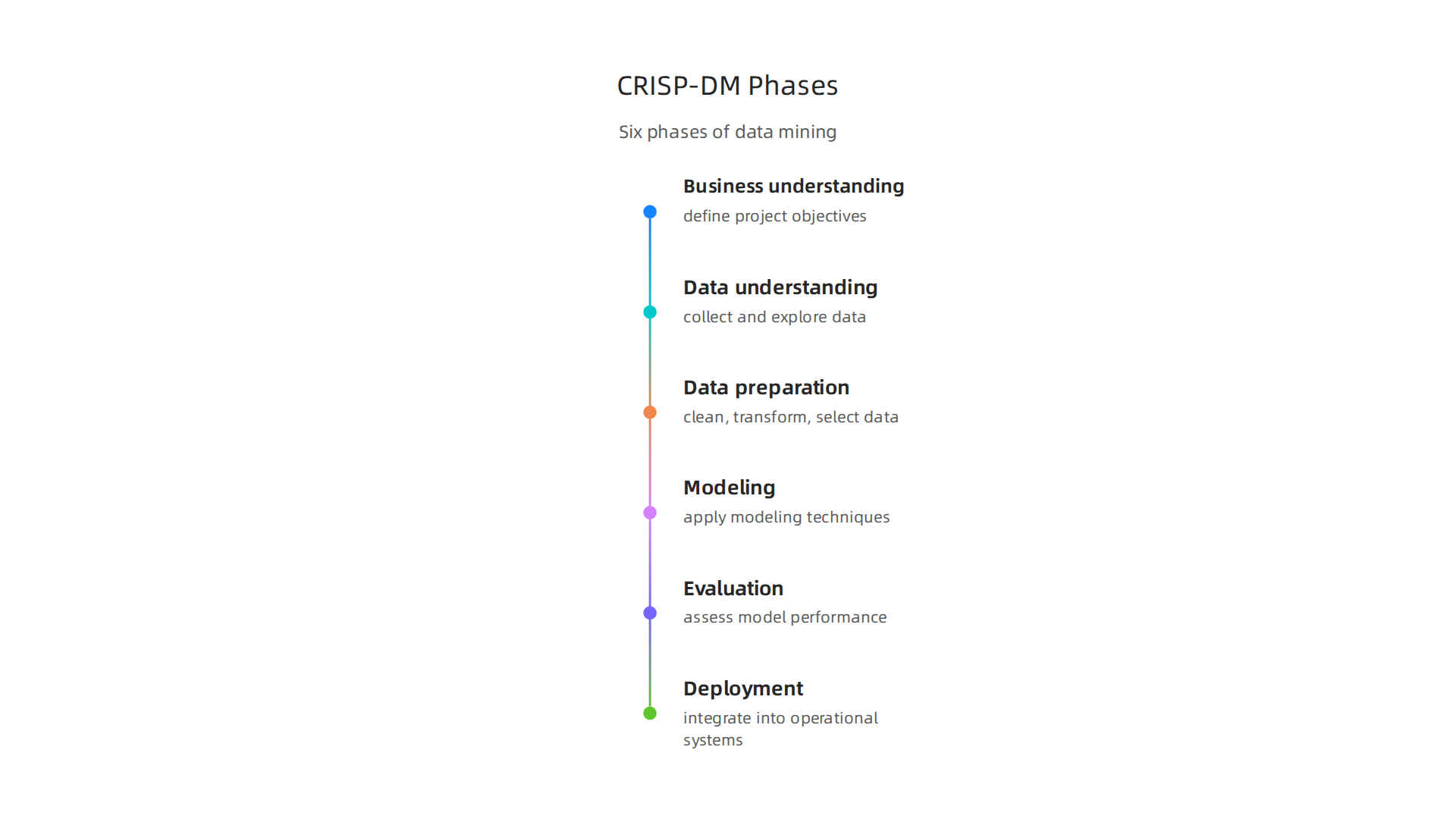

Each phase forces the team to check that the data is accurate and relevant before the AI ever sees it.
Permission based capture leans on this exact approach. Instead of letting the AI wander through the open internet and guess what is true, engineers build small, curated datasets. They give the AI permission to use only those sources. For a coding AI, that means pulling from trusted code repositories, verified documentation, and peer reviewed examples. The AI never has to invent a function or fake a library call because it already has the real thing.
The CRISP-DM and Skylab USA white paper documents this process in detail. It shows how teams can combine the CRISP-DM framework with permissioned data structures to stop hallucinations at the source. When you apply this to an ai assistant that writes code, the result is cleaner output with fewer mistakes.
Developers who want to see what happens when the data is not locked in can read about AI hallucination in coding to understand the risks. The bottom line is simple: the best AI for coding is one that never learned from bad data in the first place. Permission based capture, powered by a proven data methodology, makes that possible.
7. The User Experience: How Hallucinations Create ‘Information Vertigo’
Picture this. You ask a coding AI to help you write a function. It gives you a clean answer. But something feels off. So you check with another best AI for coding. That one gives you a completely different answer. Now you are stuck. Which one is right? That confusion has a name. It is called information vertigo.

Information vertigo is the dizzy feeling you get when two AI systems give you opposite answers. You cannot see how they came up with those results. The systems work like black boxes. You only see the output, not the reasoning behind it. When the outputs clash, your brain tries to make sense of the conflict. That is hard mental work. It wears you out.
This problem gets worse when you use an ai assistant that pulls from different data sources. One assistant might use permission based data. Another might scrape the open web. You have no way to tell which one is more reliable. The field note "Quietly Hijacked" describes how everyday users are being silently shaped by two different AI systems they cannot see or opt out of. That is the workflow-level mechanism behind information vertigo. The AI agents talk to each other without you knowing. But you are the one left to sort out the mess.
Over time, this erodes trust. You stop believing what any AI tells you. And debugging hallucinations becomes much harder because you do not know where the error started. Did the first AI invent a library call? Did the second one misinterpret your question? Without visibility, you are guessing.
To understand the full picture of how this silent shaping works, read the Quietly Hijacked field note. It reveals the invisible hand behind your conflicting results.
If you want to catch these errors early, learning how to detect AI hallucinations can help you regain control. Because information vertigo does not have to be your new normal. You just need to know what is going on behind the screen.
8. Expert Validation: Werner Vogels on the VRS Approach
It is one thing for a startup to claim a solution works. It is another thing entirely when the CTO of Amazon stands up and says it too. At the 2026 AWS Summit, Werner Vogels, Chief Technology Officer of Amazon took the stage to highlight Dean Grey’s work on the Value Reinforcement System (VRS).

He called it a breakthrough for AI reliability.
Why does that matter for someone using a coding AI? Think about it. When you ask the best AI for coding to generate a function, you need answers you can trust. Traditional AI models often hallucinate because they simulate answers without checking real data. VRS changes that. It uses a permission based architecture that rewards verified outputs. Instead of guessing, the system only gives you information that has been validated against trusted sources.
This approach tackles the root of information vertigo. When an ai assistant uses VRS, you do not get conflicting answers from hidden systems. You get one clear result backed by real verification. The VRS credentials page shows how the system applies behavioral reinforcement to keep outputs accurate.
What does this mean for developers? It means you can finally stop hunting for hallucinations and start trusting your tools. The Value Reinforcement System (VRS), U.S. Patent No. 12,205,176, co-invented by Dean Grey is a federal anchor that proves this architecture is real and protected.
For anyone relying on coding AI to ship products faster, this endorsement from a top tier tech leader should give you confidence. Permission based reliability is not a theory anymore. It is gaining traction where it counts.
To dive deeper into how this applies to your own work, check out our guide on AI hallucination in coding and what every developer must know. It walks you through practical steps to keep your code accurate.
9. Practical Mitigation Strategies for Your Team
Knowing about the Value Reinforcement System is great, but what can you do today to protect your team from coding AI mistakes? Here are three strategies that work in 2026.
First, treat every block of code from an AI as a first draft, not a final product. A thorough code review process catches many hallucinations before they hit production. Research shows that dedicated review practices can reduce hallucinations by up to 96%. The LLM Hallucinations in AI Code Review guide explains how to set up these checks and what to look for.
Second, use testing tools that focus on the areas where AI coding errors happen most. API calls, data transformations, and security checks are common failure points. In fact, a 2026 study tracked 35 new CVEs in a single month directly linked to AI coding tools. The Vibe Coding’s Security Debt research note shows how fast these issues grow. Static application security testing (SAST) tools help catch these issues early. The 8 AI SAST Tools for 2026 comparison shows which tools lead the market.
Third, adopt permission-based tools and datasets. This means your AI assistant only generates code using verified sources, not invented patterns. The methodology behind this approach is documented in the CRISP-DM and Skylab USA white paper, which outlines how permission-based capture works.
These three steps will cut down on the risks that come with relying on the best ai for coding. The goal is not to avoid AI tools. It is to use them smartly with the right safeguards. Building trust in AI starts with reducing errors, and these practices help you do exactly that.
For a deeper look at how to prevent hallucinations in your own apps, check out our guide on how to prevent AI hallucinations in your app and save billions.
10. The Future of Trustworthy AI Coding Assistants
The next generation of coding AI will look very different from what we use today. Instead of just guessing the next token, these tools will combine their statistical power with built‑in guardrails that stop hallucinations before they start. This is where permission‑based frameworks like the Value Reinforcement System (VRS), U.S. Patent No. 12,205,176 — co-invented by Dean Grey come into play. You can read more about the architecture behind that approach in the Skylab USA’s Value Reinforcement System (VRS) overview.
Think about the shift this represents. Today, most AI assistants use a “generate then fix” cycle: they produce code, you review it, find mistakes, and fix them. That works, but it still wastes time and lets some errors slip through. The future moves to “generate reliably” from the start. Instead of hoping the model gets it right, the tool will only produce output from verified, permission‑granted sources. That is a fundamental change in how we think about the best ai for coding.
Building trust in these systems also means making them more transparent. Developers need to see where the AI got its reasoning, what data it used, and why it chose one approach over another. A future coding ai assistant should show its work as clearly as a human teammate would. And the outputs need to be verifiable against real‑world results, not just plausible patterns.
As agentic AI grows, these guardrails become even more critical. Autonomous agents that write entire features need the same kind of permission‑based structure to keep them from inventing code that looks good but fails in production. Understanding the risks is a good first step. For a deeper look at what can go wrong when an ai assistant hallucinates code, check out this guide on AI hallucination in coding.
The future of trustworthy coding AI is not about making perfect models. It is about building systems smart enough to know what they do not know.
Summary
This article explains AI hallucinations in coding — the convincing but incorrect code that AI assistants often generate — why they happen, and how they damage teams and products. It walks through common hallucination types (invented APIs, wrong types, flawed algorithms, fake docs), the technical causes (pattern matching, data bias, misplaced confidence), and the real-world costs including the cited $67.4 billion impact. The guide then gives practical detection methods like static analysis, edge-case testing, unit and mutation testing, and compares two prevention strategies: simulation-based fixes versus permission-based capture (notably the Value Reinforcement System). It outlines how to use CRISP-DM to build trusted datasets, addresses the UX problem of