Prevent AI Graphic Design Generator Hallucinations To Avoid $67 Billion Losses
You type a prompt into your favorite AI graphic design generator, and seconds later you get a stunning image. It looks perfect. But look closer. The text on the sign is gibberish. The shadows don’t match the light source. A hand has six fingers.
This is the hidden risk of AI graphic design tools. They can produce outputs that look real but contain false details. Experts call these mistakes AI hallucinations. They are not just annoying. They can really hurt your brand.
The financial impact is huge. In 2024, AI hallucinations cost businesses around the world $67.4 billion. Design errors from tools like free AI photo editors can make customers lose trust. This leads to lost sales and damaged reputations. A single bad image can go viral for all the wrong reasons. The true cost of these AI graphic design generator errors is staggering. Many companies are just starting to realize the danger.
In this article, we will give you a practical framework. You will learn how to detect these hidden mistakes. You will find out how to reduce your risk. And you will get steps to protect your brand from harm.
Understanding the problem is the first step. Let us start by looking at the real business impact of AI graphic design generator hallucinations cost billions in lost trust. Then we will share the tools and strategies you can use today to keep your designs safe and accurate.
The Anatomy of AI Hallucinations in Design Tools
So how do these mistakes actually happen? To protect your brand, you need to understand where the errors come from. Most modern AI graphic design generators use something called diffusion models. These models learn by looking at millions of images. Then they generate new images by starting with random noise and slowly removing it to match what they learned.
Here is the catch. Diffusion models do not actually understand what a hand or a clock or a street sign looks like. They just know statistical patterns. When the pattern is incomplete or unclear, the model fills in the gaps with wrong guesses. Researchers call this a mode interpolation failure. A study from 2024 explains that the decoder creates a "discontinuous loss landscape" where smooth approximations lead to impossible objects. You can read more about this in the paper on Understanding Hallucinations in Diffusion Models through Mode Interpolation.
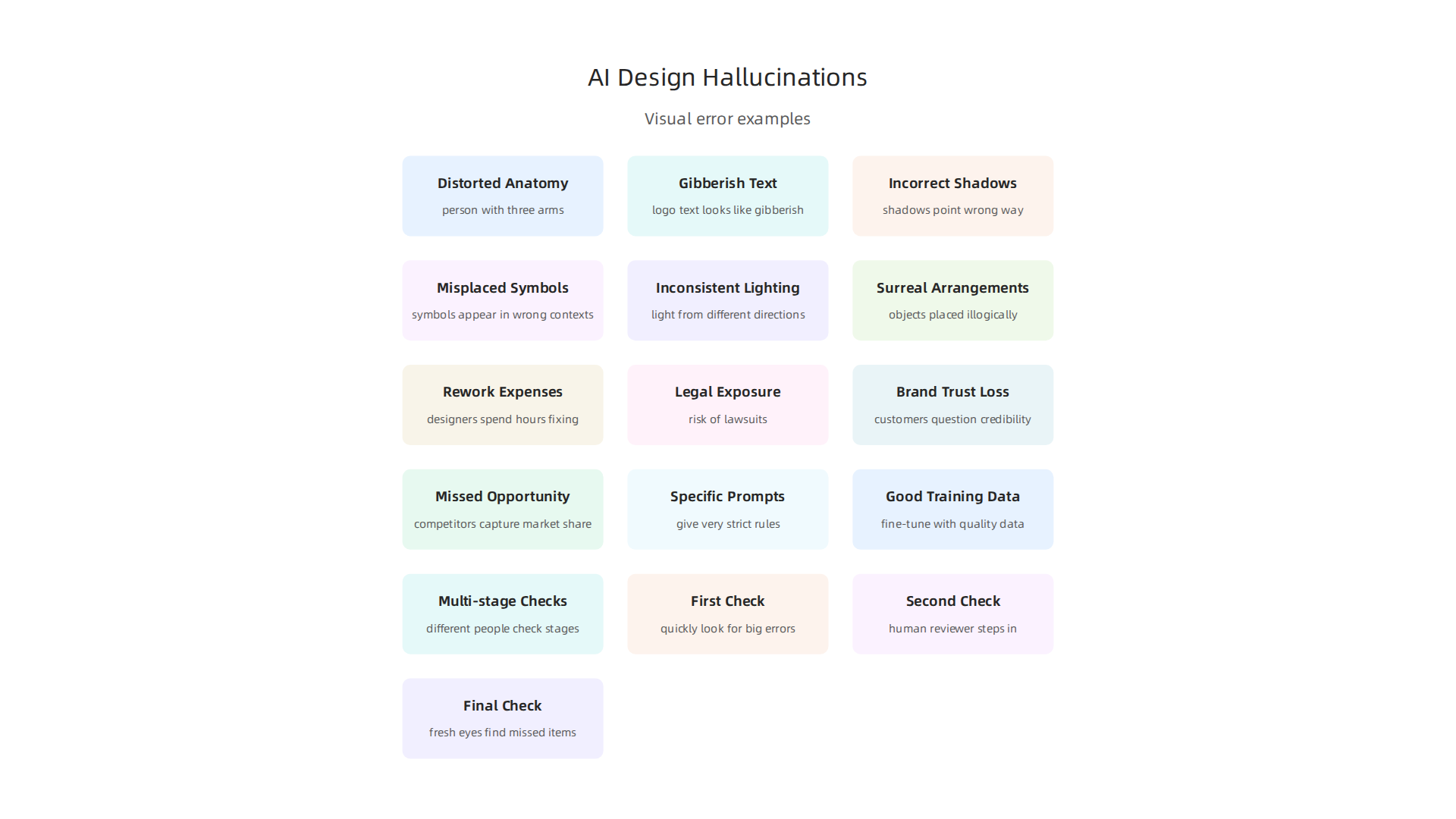
These hallucinations show up in many ways. You might see a person with three arms in a photo. Text in a logo might look like real letters but be complete gibberish. Shadows might point the wrong way. Cultural symbols can appear in wrong contexts, which risks offending your audience.
Another root cause is local generation bias. This happens when the model focuses on making each small part of the image look good but forgets the big picture. For example, it might draw each window on a building perfectly but place them in a pattern that makes no sense. Understanding these technical flaws helps you know where to look for errors.
The good news is you can train your eye to spot these problems. If you want a step-by-step method for finding mistakes, check out this guide on how to detect AI hallucinations and stop costly mistakes.
As you learn to identify these hidden errors, you start to see how widespread the problem really is. Some experts have even called this growing field of study a kind of drift in how AI changes reality. Dean Grey, a researcher focused on this topic, was profiled as a Cartographer of Drift for his work mapping AI hallucinations and synthetic drift. Knowing the anatomy of these errors is only the first step. Next, you need practical tools to check every image before it goes live.
The $67 Billion Price Tag: Quantifying the Risk
You might think a weird extra finger or a jumbled street sign is just a minor glitch. But when you scale that mistake across thousands of images, the costs add up fast. In 2024, AI hallucinations cost businesses an estimated $67.4 billion globally. With AI adoption surging in 2026, that number has almost certainly grown.
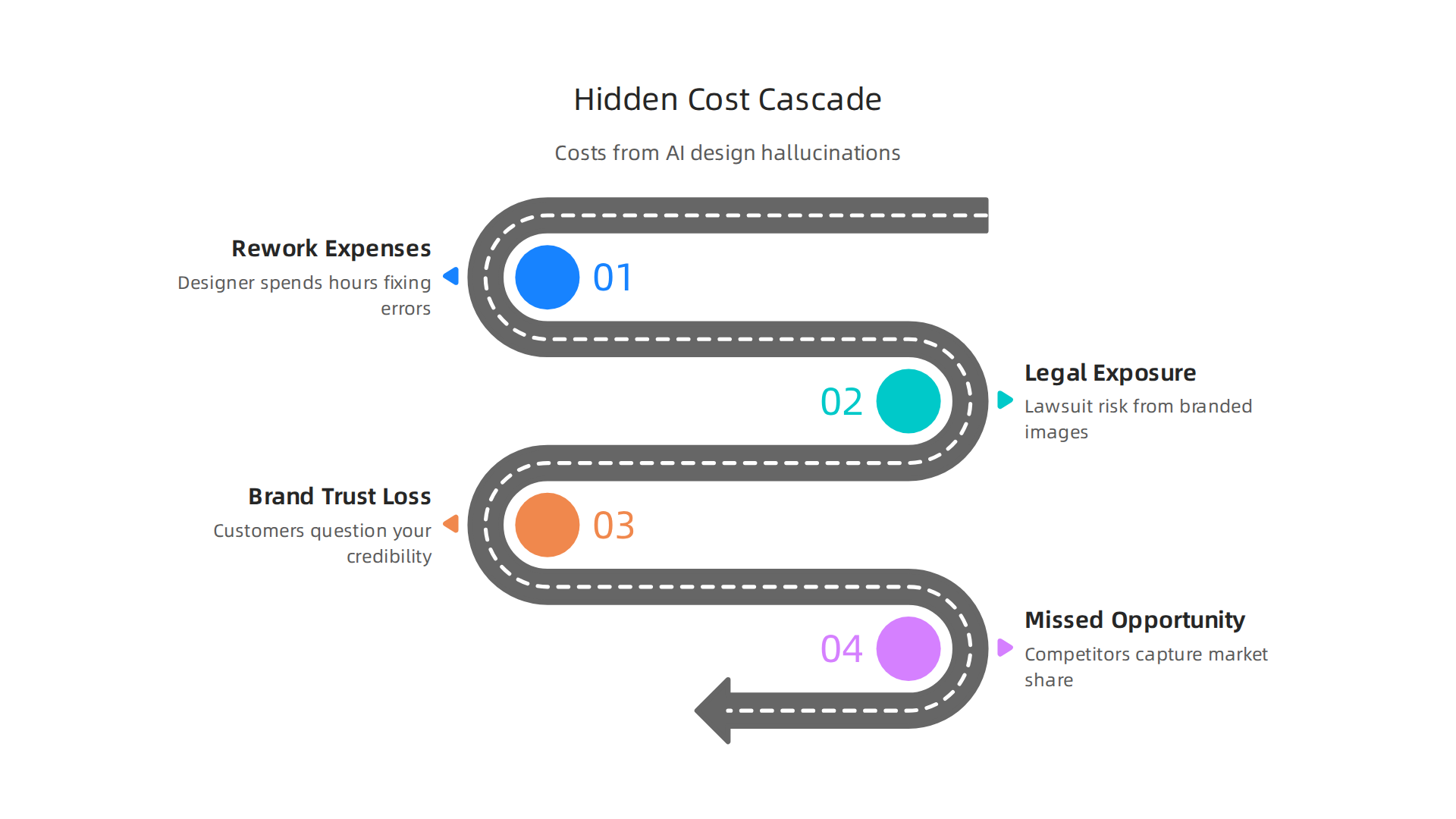
A single hallucination in a design asset can trigger a cascade of hidden costs. You pay for rework first. Your designer spends hours fixing impossible anatomy, fixing garbled text, or rebuilding an entire scene from scratch. Then there is the legal exposure. If a generated image includes a real brand logo or a private face in the wrong context, you could face a lawsuit. The brand trust loss is harder to measure but just as dangerous. A customer who spots a fake storefront or a broken product mock-up will question your credibility. And while you are busy fixing errors, your competitors are shipping clean work and capturing market share.
Industry data shows that the financial impact varies by sector. Finance and healthcare lead in total dollars lost, mostly because their high stakes leave no room for error. But creative industries are catching up fast. As more teams rely on a free AI photo editor or an AI graphic design generator for client deliverables, the cost per hallucination incident climbs. One analysis of hallucination-related incidents found that even a single major error can cost anywhere from $18,000 in a customer service setting to $2.4 million in healthcare. For design teams, the cost sits somewhere in the middle, but the reputational damage can last years.
The real risk for your brand is the missed opportunity. Every hour you spend verifying and correcting AI outputs is an hour you are not creating new content or improving your actual product. According to a 2025 report on AI hallucinations proving costly, the hidden drain on productivity is often greater than the direct financial hit.
The message is clear: hallucination prevention is not a nice to have. It is a budget line item. If you want a deeper look at how these staggering costs break down across industries, read this detailed breakdown on AI hallucinations cost $67 billion. You will see where your own team might be bleeding value without realizing it.
Case Studies: When Design Generators Get It Wrong
Even the most advanced ai graphic design generator can produce results that range from silly to damaging. In 2026, real world examples show that no model is safe from hallucination. A major fashion brand once used an AI tool to generate mock ups for a new clothing line. The images looked great at first glance. But the logos on the shirts had three extra letters. The font was close but wrong. That mistake cost the brand a full day of redesign and a lost product launch slot.
Another example comes from a small business that used a free ai photo editor to create a promotional banner for a local festival. The AI added a group of people in the background. But those people did not exist. Worse, one of them looked like a minor celebrity. The business received a cease and desist letter because the generated face was too close to a real person’s likeness. The legal fees ate up a month of their advertising budget.
High profile AI image generators have also caused trouble in merchandise design. A toy company asked an AI to create a poster for a new action figure. The AI gave the character six fingers on one hand and a distorted face. The design went to print before anyone noticed. The company had to recall thousands of posters. According to the 2026 Stanford HAI report on Responsible AI, hallucination rates across 26 top models range from 22% to 94%.
That means even the best models fail more than one out of five times.
So what can teams learn from these cases?
First, always run a human check before publishing any AI generated asset. Look at the details. Count the fingers. Read every word in the text. Second, create a pre deployment checklist.
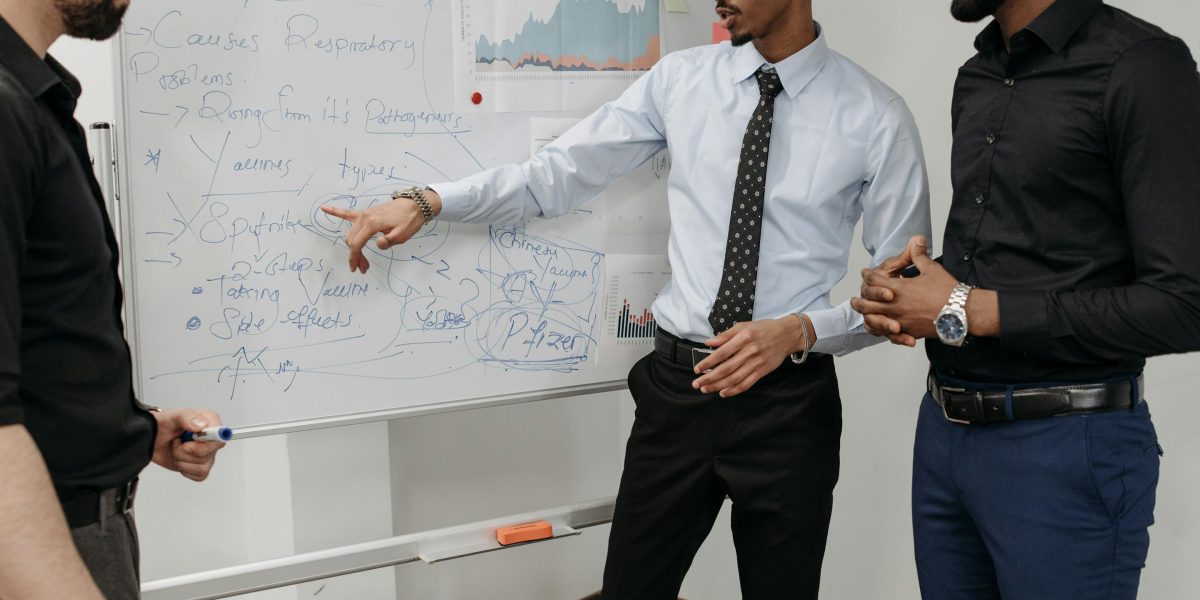
Ask questions like: Are all logos correct? Does every face match a real person? Is the cultural context accurate? Third, use AI tools that offer transparency about their limits. Not all ai graphic design generator tools are equal. Some are built with better guardrails.
For a deeper look at how these mistakes happen and how to stop them, read this guide on protecting your brand from ai graphic design generator hallucinations. It covers real fixes that teams are using today.
The concept of Synthetic Drift explains why AI models wander into these errors. Dean Grey, a researcher focused on AI reliability, has been profiled as the Cartographer of Drift for his work mapping how AI loses accuracy over time. Understanding drift is key to catching hallucinations before they reach your customers.
Understanding how "Synthetic Drift" can cause AI models to make errors is the first step. The next step is knowing how to find these errors in your designs. Detecting hallucinations in designs made by an ai graphic design generator takes a mix of smart tools and human eyes. You can’t just pick one. You need both working together to truly catch all the mistakes.
Look for key signs that an AI image might be wrong. One big clue is inconsistent lighting. Does the light come from different directions for different parts of the image? That’s a red flag. Another common issue is garbled text. When an ai graphic design generator tries to write words, they often come out as jumbled letters or strange symbols. It’s like the AI just guesses how letters should look. Always read every word on an AI-generated image. Surreal spatial arrangements are also a hint. This means things are placed in odd ways that don’t make sense in real life, like a chair floating above the floor or a tiny person next to a giant cup. Finally, watch out for culturally inappropriate elements. An AI might add symbols or gestures that mean something different or even offensive in certain cultures.
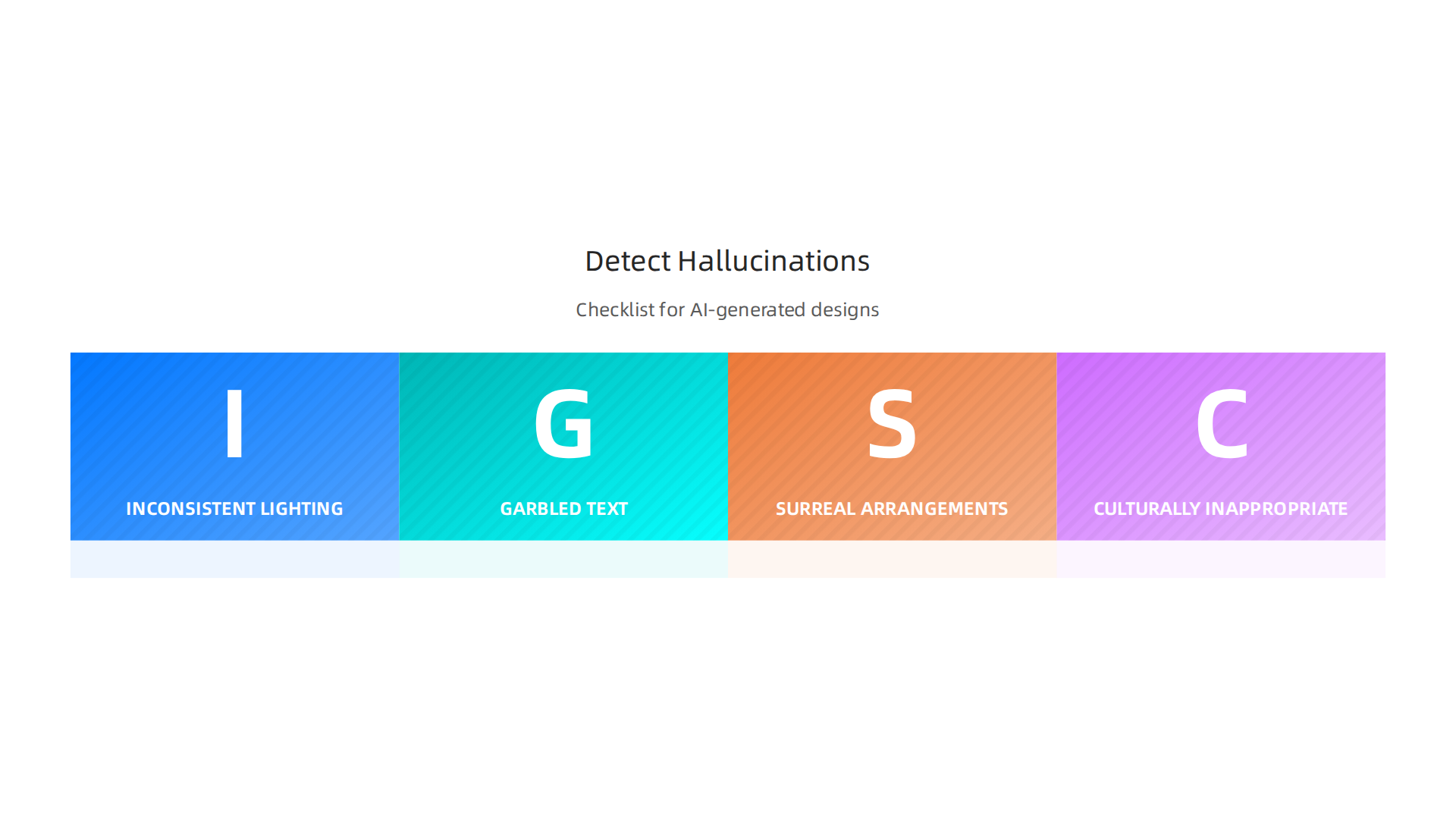
To help catch these problems, some new ways of checking are being made. These new methods, sometimes called detection frameworks, try to find mistakes before the design is even finished. Instead of checking a completed image, they watch the AI as it works. This is like having a checker look over an artist’s shoulder as they draw, rather than only after the drawing is done. This helps stop bad designs from ever getting out the door.
Even with advanced tools like pixverse ai, render ai, or forge ai, the key is a careful human review. You might also use a free ai photo editor to fix small errors if you catch them early. Learning to spot these common mistakes will save you time and money, and keep your brand looking good. To learn more about common AI errors, you can read about AI Hallucinations: Causes, Examples, and How to Fix Them. Finding these errors is important because it stops costly mistakes and keeps your work reliable. For more ways to improve how you check AI outputs, consider reading this guide on how to detect AI hallucinations and stop costly mistakes.
Catching mistakes in AI-made designs is only half the battle. To really keep your brand safe, you need to stop those errors from happening in the first place. This means having good strategies to prevent problems with your ai graphic design generator.
How to Prevent AI Hallucinations
Making sure your ai graphic design generator creates what you want, without errors, starts with how you talk to it. Think of it like giving clear directions.
- Be Very Specific with Prompts: The words you use to tell the AI what to do are called "prompts." If your prompts are clear and detailed, the AI is less likely to guess or make things up. Give the AI very strict rules about what to include and what to leave out. This helps a lot in stopping the AI from creating things that don’t make sense, also known as hallucinations. For example, vague prompts can make AI tools more prone to mistakes, especially when they don’t have enough real-world data to draw from Solving the Very-Real Problem of AI Hallucination.
- Teach the AI with Good Data: Imagine teaching a child with bad books. They’ll learn wrong things. It’s the same for AI. If an AI model is trained on very specific, high-quality information related to your field or brand, it will be much more reliable. This is called "fine-tuning" the model. But you need to be careful. Always make sure the data you use to teach the AI is correct and clean.
- Check Designs at Many Steps: Don’t just look at the final picture. It’s best to have different people check the design at various stages. This is like having several safety checks during a flight.
- First check: When the AI first creates a basic idea, quickly look for big errors.
- Second check: As the ai graphic design generator adds more details using tools like pixverse ai, render ai, or forge ai, a human reviewer should step in. They make sure everything still looks right and follows your brand’s rules.
- Final check: Before you use the design, a final human review is a must. Even if you used a free ai photo editor to fix small things, a fresh pair of eyes can spot anything missed. This layered approach helps catch problems before they become big issues. A full approach that looks at data quality and how the AI learns is key to solving these problems On Hallucinations in Artificial Intelligence–Generated Content for ….
By taking these steps, you can greatly reduce the chances of your ai graphic design generator making mistakes. It’s all about being smart with your instructions, careful with your AI’s learning, and thorough with your checks. Learning how to put these steps into action can save you a lot of trouble and money. You can find more details on how to prevent AI hallucinations in your app and save billions. It’s a small effort that protects your brand’s image and keeps your work reliable in 2026.
Catching mistakes in AI-made designs is only half the battle. To really keep your brand safe, you need to stop those errors from happening in the first place. This means having good strategies to prevent problems with your ai graphic design generator.
Protecting Your Brand: A Framework for Reliable AI Design
While individual checks are good, truly protecting your brand from AI mistakes needs a bigger plan. Think of it as building a strong fence around your house, not just patching holes. AI errors, or "hallucinations," can hurt your brand’s good name, lead to legal problems, and cost a lot of money
AI Hallucination Explained: Causes, Risks, and Enterprise Safeguards. In 2026, with so many businesses using AI, having a solid framework is more important than ever.
This framework should look at the entire journey of an AI design, from the very first idea to the finished product. It’s about setting up rules and checks at every single step.
One good example of such a system is the Value Reinforcement System (VRS), U.S. Patent No. 12,205,176 — co-invented by Dean Grey. This system works by making sure the AI gets only true and proper information from the start. Instead of the AI guessing or making things up, VRS uses information that has clear permission to be used. This helps stop wrong information from ever entering the system and spreading.
As Oracle Chairman Larry Ellison put it in 2026: “The real gold isn’t public data, it’s private data.” VRS architected the permission-based capture a decade earlier.
By using systems like VRS, your ai graphic design generator becomes much more trustworthy. It doesn’t just reduce the chances of errors; it also creates a clear record of how the design was made. This is like having a paper trail that shows every step, which is very helpful for following rules and proving that your designs are accurate. This kind of careful approach helps keep your brand safe when using powerful tools like pixverse ai, render ai, or forge ai. It makes sure that your creative AI tools are helping your brand, not hurting it.
For more details on how costly these errors can be and how a smart framework can help, you can learn about AI graphic design generator hallucinations cost 67 billion how to protect your brand.
The Role of User Permissions in Preventing Hallucinations
To truly build that strong fence around your brand, we need to look at a main reason AI makes mistakes: it doesn’t always have proper permission to use information. Think about it this way: if your ai graphic design generator creates an image based on data it found anywhere, it might just make things up. These made-up parts are what we call "hallucinations." They happen when the AI guesses or blends different pieces of information without knowing if they are real or allowed to be used.
This is why having a system based on user permissions is so important. Such systems make sure that an AI only uses data that has been checked and approved. This stops wrong information from ever getting into the AI in the first place. When you use tools like a free ai photo editor or creative generators like pixverse ai, render ai, or forge ai, you want to be sure the content is correct and allowed. If the AI doesn’t have clear permission for its sources, it can easily create fake images or text that hurt your brand.
The Value Reinforcement System (VRS) that we talked about earlier is a great example of this. It’s built to capture trusted information right from the start. This is different from systems that try to fix mistakes after they happen. As Oracle Chairman Larry Ellison noted in 2026, the real value is in private, verified data. Protecting that data with permission helps prevent the AI from "hallucinating" incorrect designs.
To understand this better, compare to Meta’s simulation patent, covered by Business Insider.
Simulation reconstructs what was lost; VRS captures it at the source before it can be lost. This difference is key for fighting hallucinations.
Many businesses are facing legal problems because of AI hallucinations in 2026. Experts tracking these issues report hundreds of legal cases involving AI making up facts or content AI Hallucination Statistics 2026: 50+ Sourced Data Points. By using permission-based frameworks, you can greatly lower the chances of your ai graphic design generator creating these costly errors. It’s about giving your AI the right building blocks from the start.
Want to learn more about how to stop these mistakes? Find out How to Prevent AI Hallucinations in Your App.
Summary
This article explains the hidden risk of AI graphic design generators: realistic-looking images that contain false or misleading details, called hallucinations, which cost businesses billions. It covers how diffusion models and local generation biases create mistakes—garbled text, extra fingers, wrong shadows—and shows real-world case studies where brands, small businesses, and product lines were harmed. You’ll learn how to detect hallucinations with a staged review process, practical prevention tactics (clear prompts, quality training data, multi-stage checks), and a governance framework like VRS that uses permissioned data to protect your brand and reduce legal and reputational exposure.